# Getting started with Reports

<span style="font-size: 12pt; font-family: Arial,sans-serif; color: #000000; background-color: transparent; font-weight: 400; font-style: normal; font-variant: normal; text-decoration: none; vertical-align: baseline; white-space: pre-wrap;">To generate the report, go to the "My Team" section, select the users for whom you want to get the report, and click "Create Report".</span>

[![](https://mngrman.a-tracker.net/uploads/images/gallery/2024-08/scaled-1680-/image-1722851886443.png)](https://mngrman.a-tracker.net/uploads/images/gallery/2024-08/image-1722851886443.png)


<span style="font-size: 12pt; font-family: Arial,sans-serif; color: #000000; background-color: transparent; font-weight: 400; font-style: normal; font-variant: normal; text-decoration: none; vertical-align: baseline; white-space: pre-wrap;">Specify the reporting period in the next window. </span>

[![](https://mngrman.a-tracker.net/uploads/images/gallery/2024-08/scaled-1680-/image-1722852272260.png)](https://mngrman.a-tracker.net/uploads/images/gallery/2024-08/image-1722852272260.png)

<span style="font-size: 12pt; font-family: Arial,sans-serif; color: #000000; background-color: transparent; font-weight: 400; font-style: normal; font-variant: normal; text-decoration: none; vertical-align: baseline; white-space: pre-wrap;">After you select the period, go to the generated report. To do this, press “Form report”. </span>

[![](https://mngrman.a-tracker.net/uploads/images/gallery/2024-08/scaled-1680-/image-1722852356369.png)](https://mngrman.a-tracker.net/uploads/images/gallery/2024-08/image-1722852356369.png)

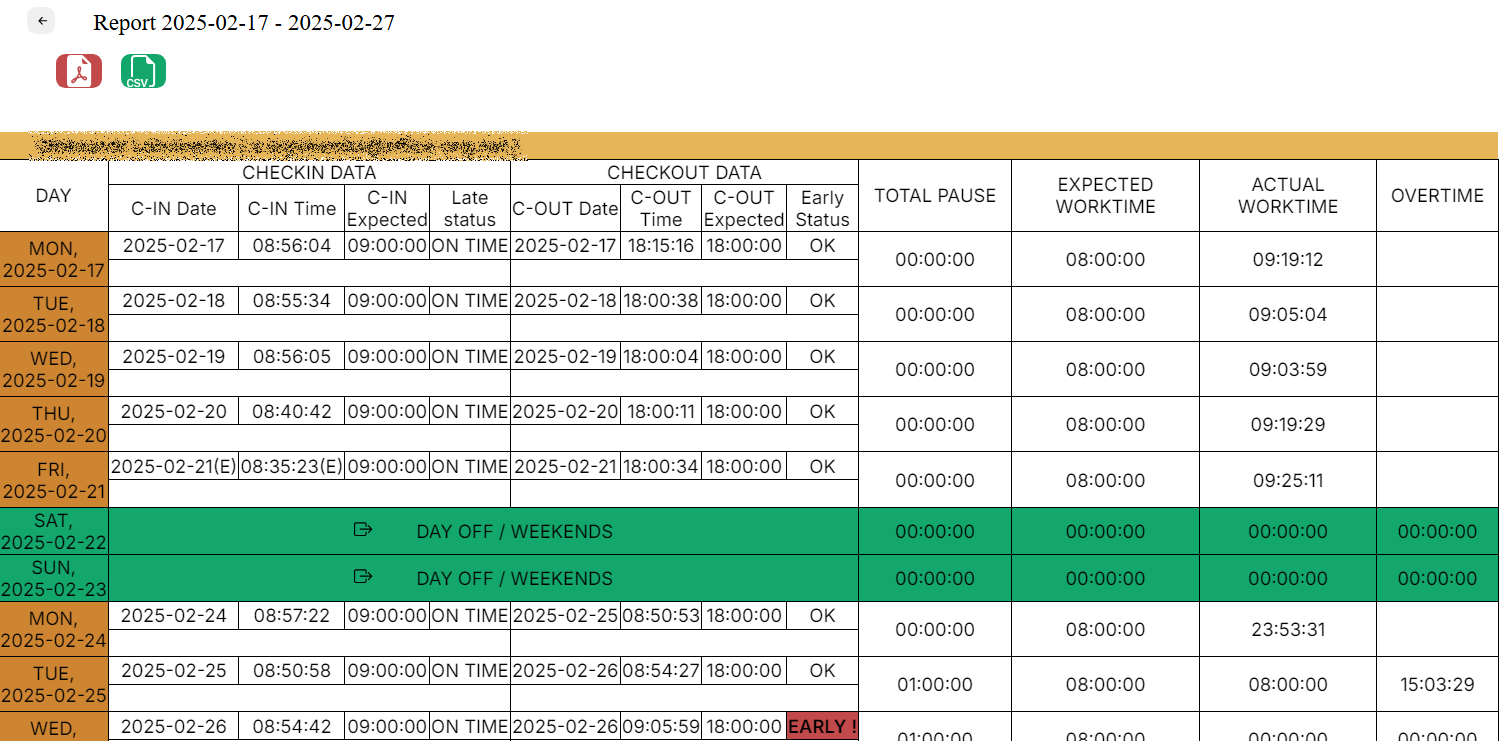
<span style="font-size: 12pt; font-family: Arial,sans-serif; color: #000000; background-color: transparent; font-weight: 400; font-style: normal; font-variant: normal; text-decoration: none; vertical-align: baseline; white-space: pre-wrap;">In the next window is a report on selected users for the specified period.</span>

[![](https://mngrman.a-tracker.net/uploads/images/gallery/2025-02/scaled-1680-/image-1740700744281.png)](https://mngrman.a-tracker.net/uploads/images/gallery/2025-02/image-1740700744281.png)

<span style="font-size: 12pt; font-family: Arial,sans-serif; color: #000000; background-color: transparent; font-weight: 400; font-style: normal; font-variant: normal; text-decoration: none; vertical-align: baseline; white-space: pre-wrap;">The report can be downloaded as a pdf or csv by pressing the button, as shown in the screenshot below.</span>

[![](https://mngrman.a-tracker.net/uploads/images/gallery/2024-08/scaled-1680-/image-1722852775078.png)](https://mngrman.a-tracker.net/uploads/images/gallery/2024-08/image-1722852775078.png)

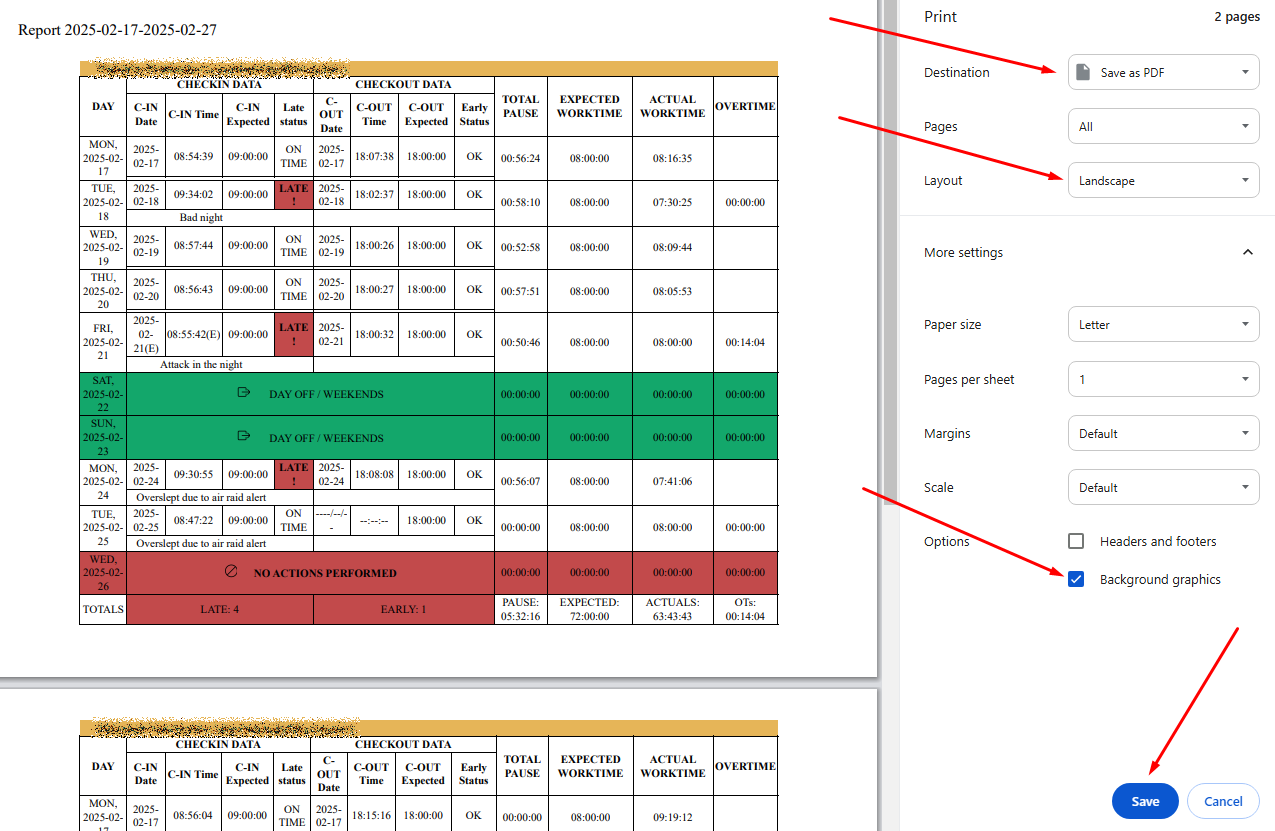
<span style="font-size: 12pt; font-family: Arial,sans-serif; color: #000000; background-color: transparent; font-weight: 400; font-style: normal; font-variant: normal; text-decoration: none; vertical-align: baseline; white-space: pre-wrap;">A new window will open in the browser, which allows you to download the report.</span>

<span style="font-size: 12pt; font-family: Arial,sans-serif; color: #000000; background-color: transparent; font-weight: 400; font-style: normal; font-variant: normal; text-decoration: none; vertical-align: baseline; white-space: pre-wrap;">If you want background coloring to be printed as well, press “More settings” and check “Background graphics” in the “Options” section, as shown in the screenshot below.</span><span style="font-weight: normal;">  
</span>

[![](https://mngrman.a-tracker.net/uploads/images/gallery/2025-02/scaled-1680-/image-1740700868620.png)](https://mngrman.a-tracker.net/uploads/images/gallery/2025-02/image-1740700868620.png)