# Reports


# Important note

<span style="font-size: 12pt; font-family: Arial,sans-serif; color: #000000; background-color: transparent; font-weight: 400; font-style: normal; font-variant: normal; text-decoration: none; vertical-align: baseline; white-space: pre-wrap;">The Action Tracker system provides functionality that allows you to generate reports on the activity of contractors in a team for a period and download them in pdf and csv formats..</span>

[![](https://mngrman.a-tracker.net/uploads/images/gallery/2024-08/scaled-1680-/image-1722851864860.png)](https://mngrman.a-tracker.net/uploads/images/gallery/2024-08/image-1722851864860.png)

<span style="font-size: 12pt; font-family: Arial,sans-serif; color: #000000; background-color: transparent; font-weight: 400; font-style: normal; font-variant: normal; text-decoration: none; vertical-align: baseline; white-space: pre-wrap;">The system implements two types of reports that differ in the logic of calculating the time worked by marks Check-in/Check-out:</span>

- <span style="font-size: 12pt; font-family: Arial,sans-serif; color: #000000; background-color: transparent; font-weight: 400; font-style: normal; font-variant: normal; text-decoration: none; vertical-align: baseline; white-space: pre-wrap;">**Hourly Rate** - implies payment by the hour.</span>
- <span style="font-size: 12pt; font-family: Arial,sans-serif; color: #000000; background-color: transparent; font-weight: 400; font-style: normal; font-variant: normal; text-decoration: none; vertical-align: baseline; white-space: pre-wrap;">**Fixed Rate** - involves a flat rate of pay</span>

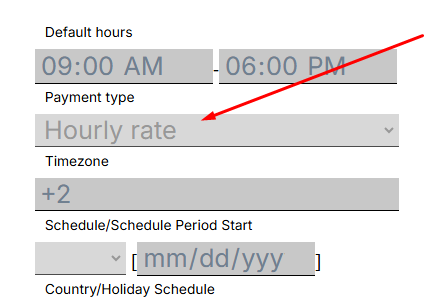
<span style="font-size: 12pt; font-family: Arial,sans-serif; color: #000000; background-color: transparent; font-weight: 400; font-style: normal; font-variant: normal; text-decoration: none; vertical-align: baseline; white-space: pre-wrap;">**Report Hourly Rate** - applies to contractors who have an hourly payment type. You can check which type is set for a contract employee in their profile</span>

[![](https://mngrman.a-tracker.net/uploads/images/gallery/2025-02/scaled-1680-/image-1740699474361.png)](https://mngrman.a-tracker.net/uploads/images/gallery/2025-02/image-1740699474361.png)

<span style="font-size: 12pt; font-family: Arial,sans-serif; color: #000000; background-color: transparent; font-weight: 400; font-style: normal; font-variant: normal; text-decoration: none; vertical-align: baseline; white-space: pre-wrap;">Key features of the report Hourly Rate:</span>

- <span style="font-size: 12pt; font-family: Arial,sans-serif; color: #000000; background-color: transparent; font-weight: 400; font-style: normal; font-variant: normal; text-decoration: none; vertical-align: baseline; white-space: pre-wrap;">The total time between the executed Check-in та Check-out</span>
- <span style="font-size: 12pt; font-family: Arial,sans-serif; color: #000000; background-color: transparent; font-weight: 400; font-style: normal; font-variant: normal; text-decoration: none; vertical-align: baseline; white-space: pre-wrap;">A fixed 1-hour pause is automatically deducted from the total time of the work shift. </span>
- <span style="font-size: 12pt; font-family: Arial,sans-serif; color: #000000; background-color: transparent; font-weight: 400; font-style: normal; font-variant: normal; text-decoration: none; vertical-align: baseline; white-space: pre-wrap;">Overtime, are automatically recorded in the report. </span>
- <span style="font-size: 12pt; font-family: Arial,sans-serif; color: #000000; background-color: transparent; font-weight: 400; font-style: normal; font-variant: normal; text-decoration: none; vertical-align: baseline; white-space: pre-wrap;">The manager may include unrecorded overtime in the contractors employment schedule. </span>

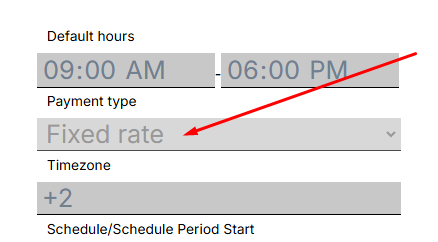
<span style="font-size: 12pt; font-family: Arial,sans-serif; color: #000000; background-color: transparent; font-weight: 400; font-style: normal; font-variant: normal; text-decoration: none; vertical-align: baseline; white-space: pre-wrap;">**Report Fixed Rate** - applies to contractors whose payment type is fixed rate. You can check which type is set for a contractor in his profile</span>

[![](https://mngrman.a-tracker.net/uploads/images/gallery/2025-02/scaled-1680-/image-1740700095391.png)](https://mngrman.a-tracker.net/uploads/images/gallery/2025-02/image-1740700095391.png)

<span style="font-size: 12pt; font-family: Arial,sans-serif; color: #000000; background-color: transparent; font-weight: 400; font-style: normal; font-variant: normal; text-decoration: none; vertical-align: baseline; white-space: pre-wrap;">Key features of the report Fixed Rate:</span>

- <span style="font-size: 12pt; font-family: Arial,sans-serif; color: #000000; background-color: transparent; font-weight: 400; font-style: normal; font-variant: normal; text-decoration: none; vertical-align: baseline; white-space: pre-wrap;">The report takes the hours specified in the contractor`s schedule.</span>
- <span style="font-size: 12pt; font-family: Arial,sans-serif; color: #000000; background-color: transparent; font-weight: 400; font-style: normal; font-variant: normal; text-decoration: none; vertical-align: baseline; white-space: pre-wrap;">A fixed pause of 1 hour is automatically deducted from the working hours defined in the employment schedule. </span>
- <span style="font-size: 12pt; font-family: Arial,sans-serif; color: #000000; background-color: transparent; font-weight: 400; font-style: normal; font-variant: normal; text-decoration: none; vertical-align: baseline; white-space: pre-wrap;">Overtime, are not recorded in the report. </span>
- <span style="font-size: 12pt; font-family: Arial,sans-serif; color: #000000; background-color: transparent; font-weight: 400; font-style: normal; font-variant: normal; text-decoration: none; vertical-align: baseline; white-space: pre-wrap;">Overtime hours are entered manually by the manager. </span>

<span style="font-size: 12pt; font-family: Arial,sans-serif; color: #000000; background-color: transparent; font-weight: bold; font-style: italic; font-variant: normal; text-decoration: none; vertical-align: baseline; white-space: pre-wrap;">Important: it is not recommended to generate a report for a period longer than 30 days, especially if you have a large team. This can take a lot of time.</span><span style="font-size: 12pt; font-family: Arial,sans-serif; color: #434343; background-color: transparent; font-weight: bold; font-style: italic; font-variant: normal; text-decoration: none; vertical-align: baseline; white-space: pre-wrap;"> </span><span style="font-size: 12pt; font-family: Arial,sans-serif; color: #434343; background-color: transparent; font-weight: 400; font-style: normal; font-variant: normal; text-decoration: none; vertical-align: baseline; white-space: pre-wrap;"> </span>

<span style="font-weight: normal;">  


</span>

# Getting started with Reports

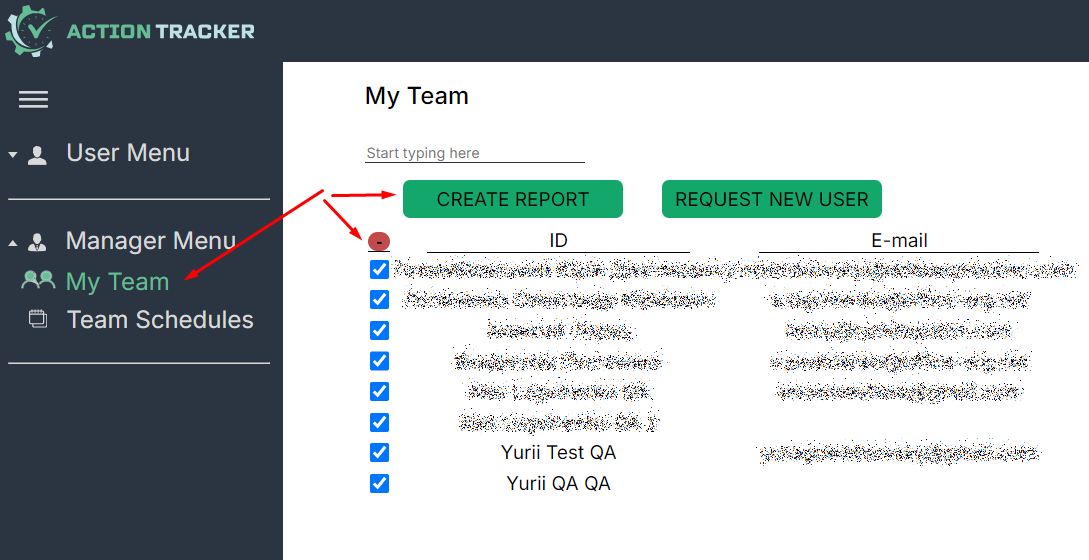
<span style="font-size: 12pt; font-family: Arial,sans-serif; color: #000000; background-color: transparent; font-weight: 400; font-style: normal; font-variant: normal; text-decoration: none; vertical-align: baseline; white-space: pre-wrap;">To generate the report, go to the "My Team" section, select the users for whom you want to get the report, and click "Create Report".</span>

[![](https://mngrman.a-tracker.net/uploads/images/gallery/2024-08/scaled-1680-/image-1722851886443.png)](https://mngrman.a-tracker.net/uploads/images/gallery/2024-08/image-1722851886443.png)


<span style="font-size: 12pt; font-family: Arial,sans-serif; color: #000000; background-color: transparent; font-weight: 400; font-style: normal; font-variant: normal; text-decoration: none; vertical-align: baseline; white-space: pre-wrap;">Specify the reporting period in the next window. </span>

[![](https://mngrman.a-tracker.net/uploads/images/gallery/2024-08/scaled-1680-/image-1722852272260.png)](https://mngrman.a-tracker.net/uploads/images/gallery/2024-08/image-1722852272260.png)

<span style="font-size: 12pt; font-family: Arial,sans-serif; color: #000000; background-color: transparent; font-weight: 400; font-style: normal; font-variant: normal; text-decoration: none; vertical-align: baseline; white-space: pre-wrap;">After you select the period, go to the generated report. To do this, press “Form report”. </span>

[![](https://mngrman.a-tracker.net/uploads/images/gallery/2024-08/scaled-1680-/image-1722852356369.png)](https://mngrman.a-tracker.net/uploads/images/gallery/2024-08/image-1722852356369.png)

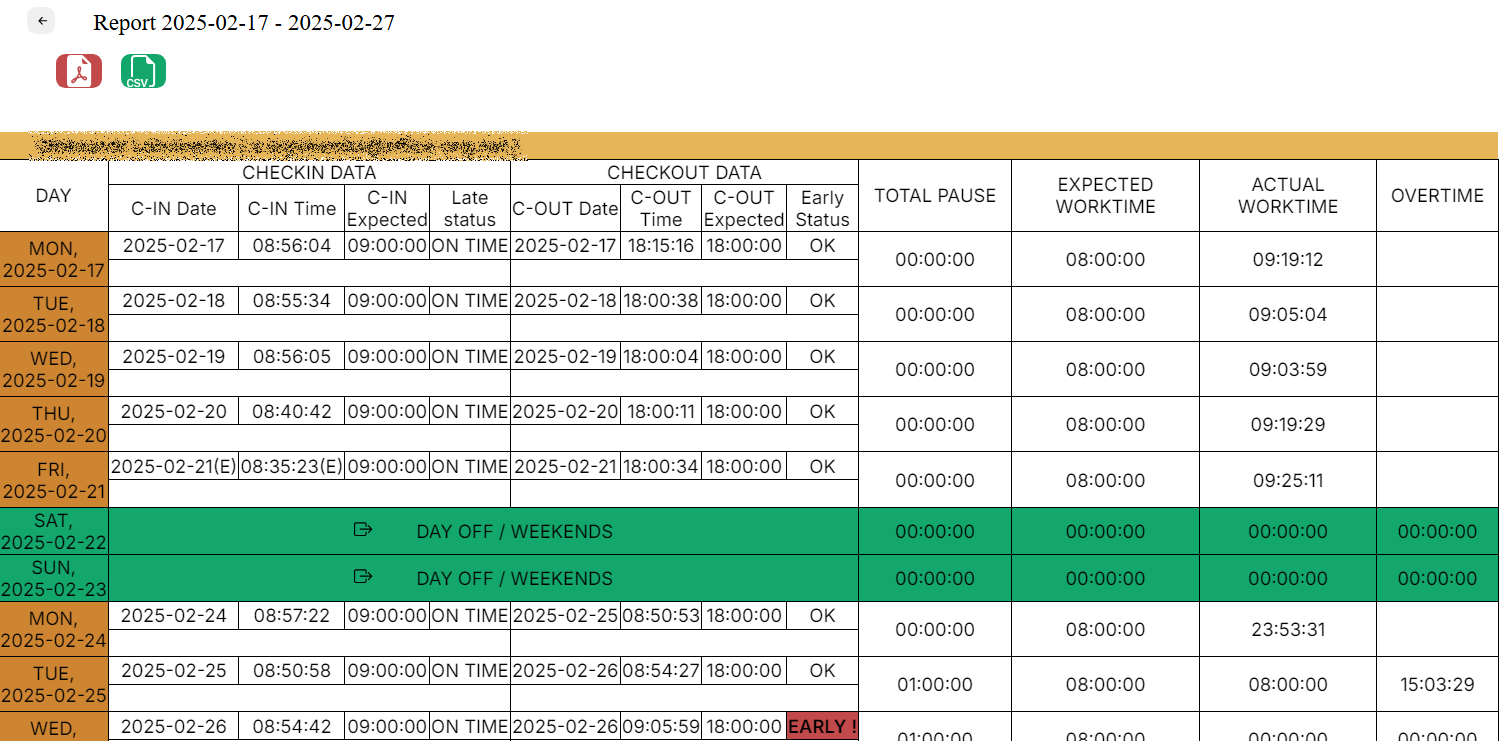
<span style="font-size: 12pt; font-family: Arial,sans-serif; color: #000000; background-color: transparent; font-weight: 400; font-style: normal; font-variant: normal; text-decoration: none; vertical-align: baseline; white-space: pre-wrap;">In the next window is a report on selected users for the specified period.</span>

[![](https://mngrman.a-tracker.net/uploads/images/gallery/2025-02/scaled-1680-/image-1740700744281.png)](https://mngrman.a-tracker.net/uploads/images/gallery/2025-02/image-1740700744281.png)

<span style="font-size: 12pt; font-family: Arial,sans-serif; color: #000000; background-color: transparent; font-weight: 400; font-style: normal; font-variant: normal; text-decoration: none; vertical-align: baseline; white-space: pre-wrap;">The report can be downloaded as a pdf or csv by pressing the button, as shown in the screenshot below.</span>

[![](https://mngrman.a-tracker.net/uploads/images/gallery/2024-08/scaled-1680-/image-1722852775078.png)](https://mngrman.a-tracker.net/uploads/images/gallery/2024-08/image-1722852775078.png)

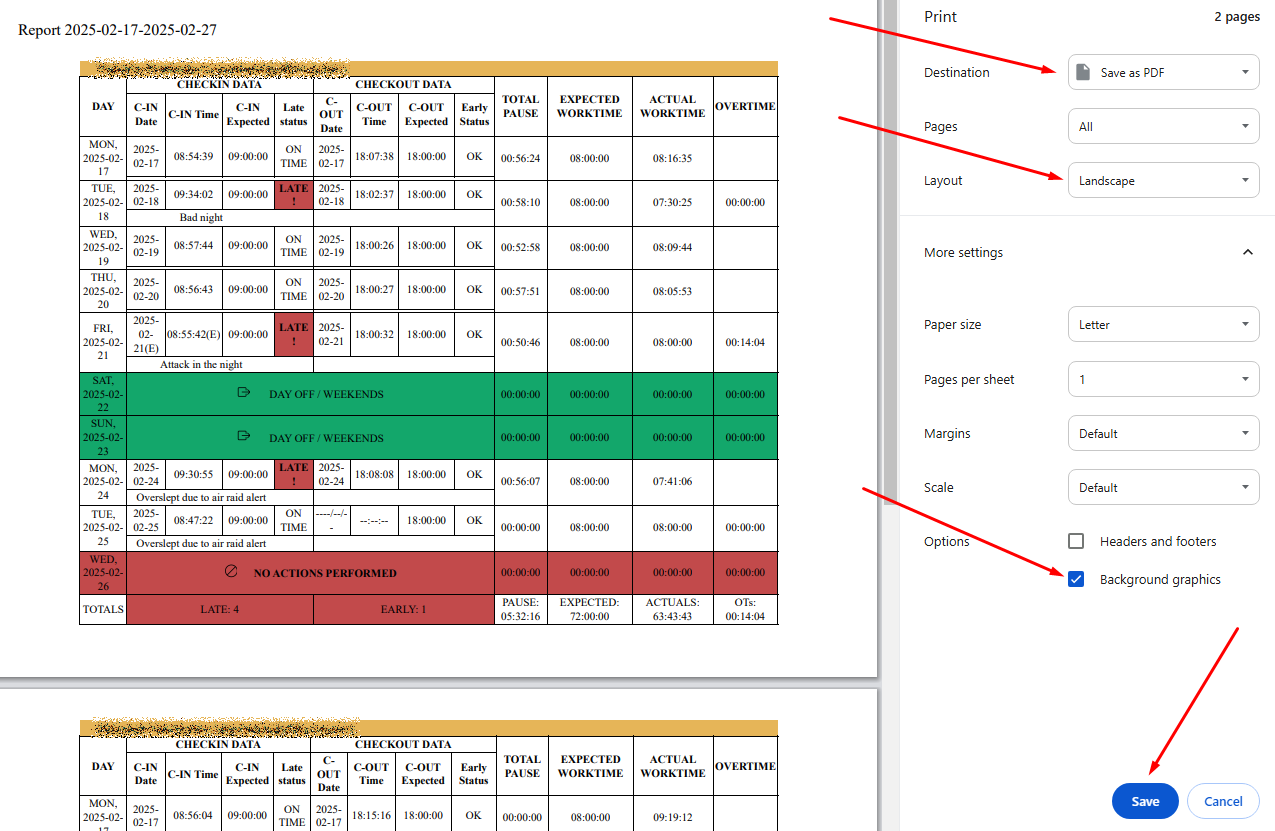
<span style="font-size: 12pt; font-family: Arial,sans-serif; color: #000000; background-color: transparent; font-weight: 400; font-style: normal; font-variant: normal; text-decoration: none; vertical-align: baseline; white-space: pre-wrap;">A new window will open in the browser, which allows you to download the report.</span>

<span style="font-size: 12pt; font-family: Arial,sans-serif; color: #000000; background-color: transparent; font-weight: 400; font-style: normal; font-variant: normal; text-decoration: none; vertical-align: baseline; white-space: pre-wrap;">If you want background coloring to be printed as well, press “More settings” and check “Background graphics” in the “Options” section, as shown in the screenshot below.</span><span style="font-weight: normal;">  
</span>

[![](https://mngrman.a-tracker.net/uploads/images/gallery/2025-02/scaled-1680-/image-1740700868620.png)](https://mngrman.a-tracker.net/uploads/images/gallery/2025-02/image-1740700868620.png)