# My Team


# Overview

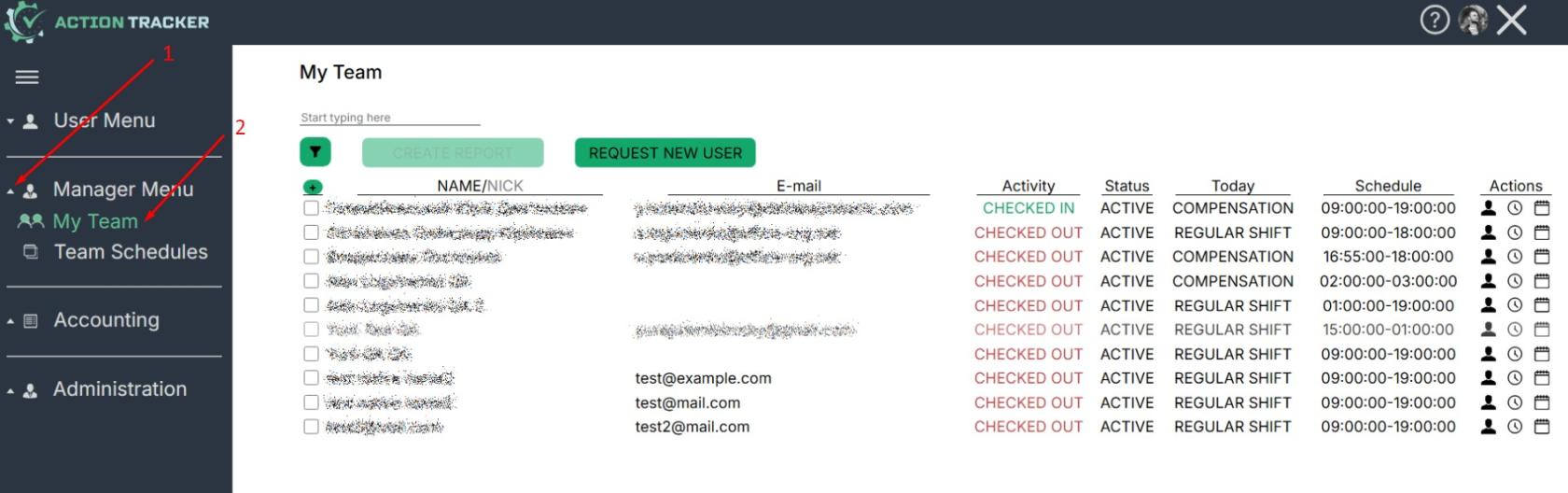
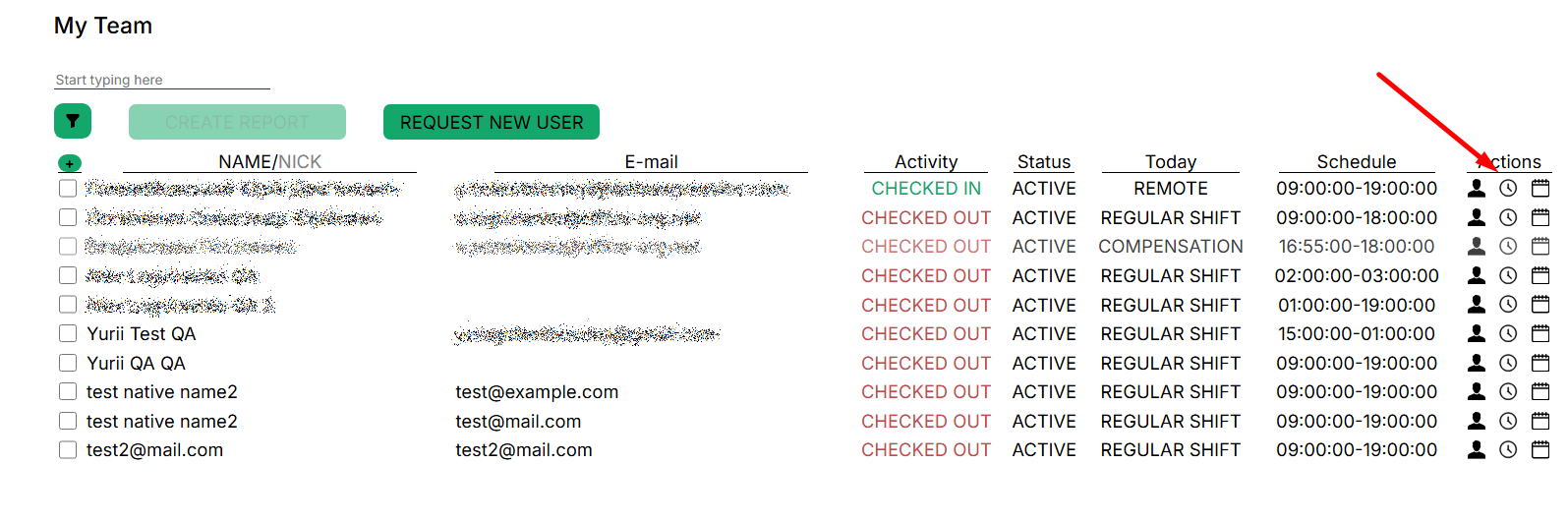
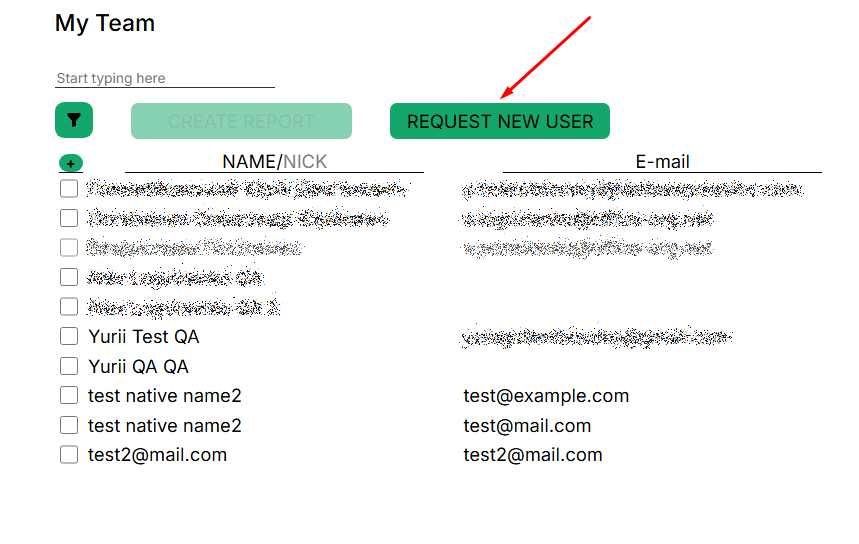
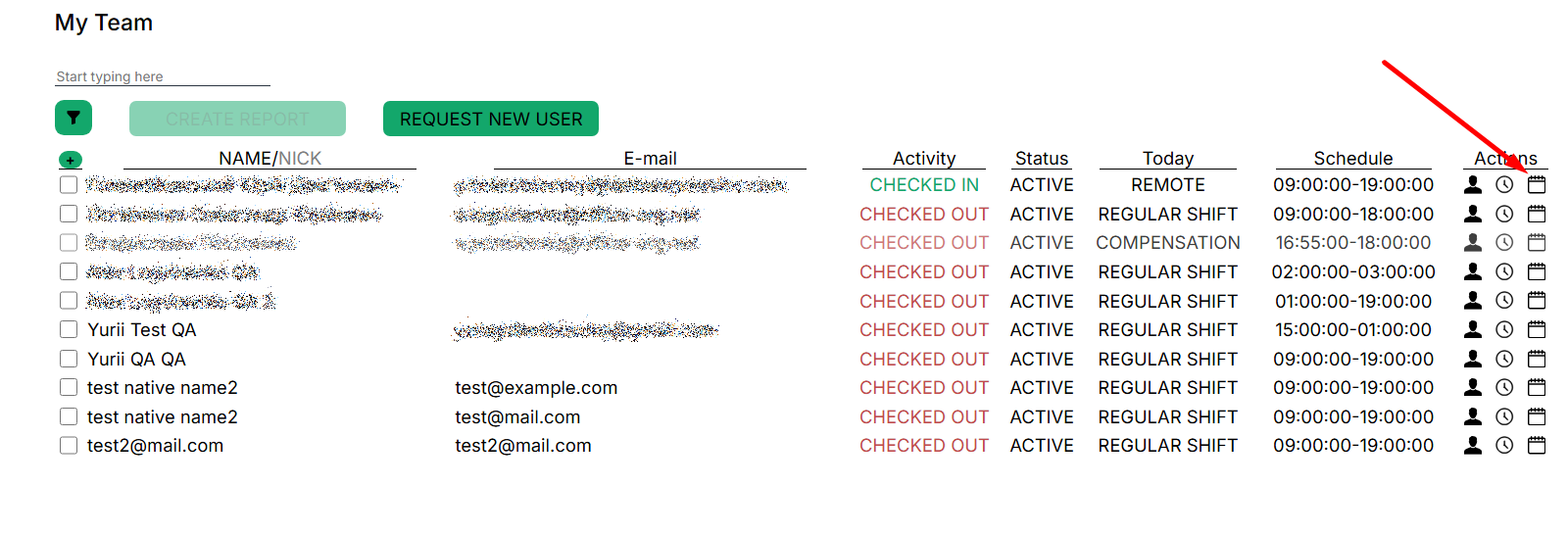
<span style="font-size: 12pt; font-family: Arial,sans-serif; color: #000000; background-color: transparent; font-weight: 400; font-style: normal; font-variant: normal; text-decoration: none; vertical-align: baseline; white-space: pre-wrap;">In the My Team section, the manager can view the most complete information on the team, namely these elements:</span>

[![](https://mngrman.a-tracker.net/uploads/images/gallery/2025-02/scaled-1680-/image-1740061550436.jpg)](https://mngrman.a-tracker.net/uploads/images/gallery/2025-02/image-1740061550436.jpg)

<span style="font-size: 12pt; font-family: Arial,sans-serif; color: #000000; background-color: transparent; font-weight: 400; font-style: normal; font-variant: normal; text-decoration: none; vertical-align: baseline; white-space: pre-wrap;">- user profile,</span>

<span style="font-size: 12pt; font-family: Arial,sans-serif; color: #000000; background-color: transparent; font-weight: 400; font-style: normal; font-variant: normal; text-decoration: none; vertical-align: baseline; white-space: pre-wrap;">- activity history,</span>

<span style="font-size: 12pt; font-family: Arial,sans-serif; color: #000000; background-color: transparent; font-weight: 400; font-style: normal; font-variant: normal; text-decoration: none; vertical-align: baseline; white-space: pre-wrap;">- calendar and work schedule — attendance records,</span>

<span style="font-size: 12pt; font-family: Arial,sans-serif; color: #000000; background-color: transparent; font-weight: 400; font-style: normal; font-variant: normal; text-decoration: none; vertical-align: baseline; white-space: pre-wrap;">- activity, </span>

<span style="font-size: 12pt; font-family: Arial,sans-serif; color: #000000; background-color: transparent; font-weight: 400; font-style: normal; font-variant: normal; text-decoration: none; vertical-align: baseline; white-space: pre-wrap;">- status in the system, </span>

<span style="font-size: 12pt; font-family: Arial,sans-serif; color: #000000; background-color: transparent; font-weight: 400; font-style: normal; font-variant: normal; text-decoration: none; vertical-align: baseline; white-space: pre-wrap;">- schedule for today, </span>

<span style="font-size: 12pt; font-family: Arial,sans-serif; color: #000000; background-color: transparent; font-weight: 400; font-style: normal; font-variant: normal; text-decoration: none; vertical-align: baseline; white-space: pre-wrap;">- schedule.</span>

<span style="font-size: 16pt; font-family: Arial,sans-serif; color: #000000; background-color: transparent; font-weight: 400; font-style: normal; font-variant: normal; text-decoration: none; vertical-align: baseline; white-space: pre-wrap;">My Team Interface</span>

[![](https://mngrman.a-tracker.net/uploads/images/gallery/2025-02/scaled-1680-/image-1740128063988.jpg)](https://mngrman.a-tracker.net/uploads/images/gallery/2025-02/image-1740128063988.jpg)

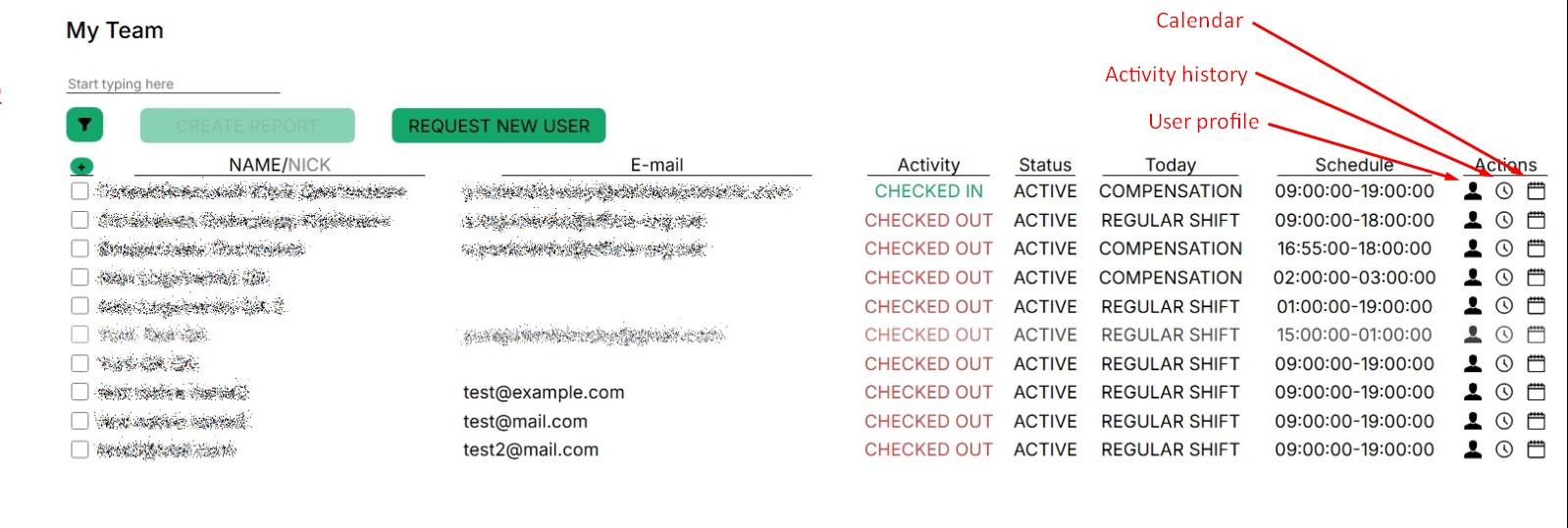
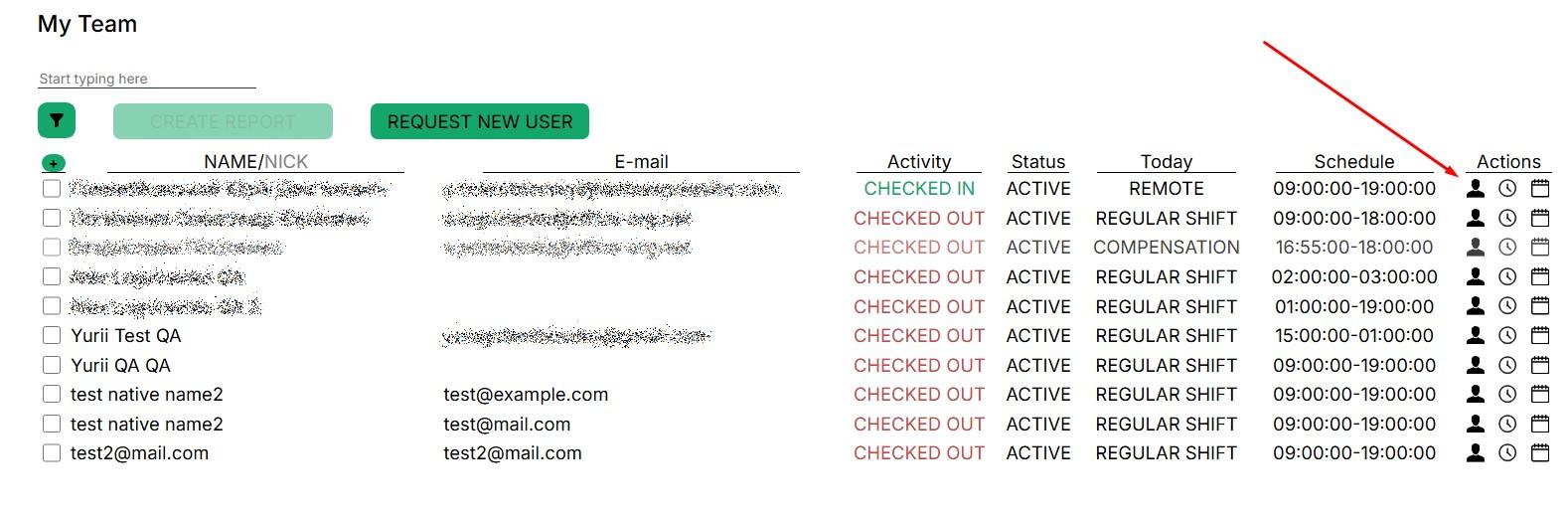
<span style="font-size: 12pt; font-family: Arial,sans-serif; color: #000000; background-color: transparent; font-weight: 400; font-style: normal; font-variant: normal; text-decoration: none; vertical-align: baseline; white-space: pre-wrap;">- User's first and second name,</span>

<span style="font-size: 12pt; font-family: Arial,sans-serif; color: #000000; background-color: transparent; font-weight: 400; font-style: normal; font-variant: normal; text-decoration: none; vertical-align: baseline; white-space: pre-wrap;">- Email, user's primary email (additional email addresses are in the profile),</span>

<span style="font-size: 12pt; font-family: Arial,sans-serif; color: #000000; background-color: transparent; font-weight: 400; font-style: normal; font-variant: normal; text-decoration: none; vertical-align: baseline; white-space: pre-wrap;">- action currently performed,</span>

<span style="font-size: 12pt; font-family: Arial,sans-serif; color: #000000; background-color: transparent; font-weight: 400; font-style: normal; font-variant: normal; text-decoration: none; vertical-align: baseline; white-space: pre-wrap;">- status in the system,</span>

<span style="font-size: 12pt; font-family: Arial,sans-serif; color: #000000; background-color: transparent; font-weight: 400; font-style: normal; font-variant: normal; text-decoration: none; vertical-align: baseline; white-space: pre-wrap;">- schedule assigned for today,</span>

<span style="font-size: 12pt; font-family: Arial,sans-serif; color: #000000; background-color: transparent; font-weight: 400; font-style: normal; font-variant: normal; text-decoration: none; vertical-align: baseline; white-space: pre-wrap;">- work schedule,</span>

<span style="font-size: 12pt; font-family: Arial,sans-serif; color: #000000; background-color: transparent; font-weight: 400; font-style: normal; font-variant: normal; text-decoration: none; vertical-align: baseline; white-space: pre-wrap;">- user profile,</span>

<span style="font-size: 12pt; font-family: Arial,sans-serif; color: #000000; background-color: transparent; font-weight: 400; font-style: normal; font-variant: normal; text-decoration: none; vertical-align: baseline; white-space: pre-wrap;">- activity history,</span>

<span style="font-size: 12pt; font-family: Arial,sans-serif; color: #000000; background-color: transparent; font-weight: 400; font-style: normal; font-variant: normal; text-decoration: none; vertical-align: baseline; white-space: pre-wrap;">- calendar and work schedule — attendance records.</span>

<span style="font-size: 12pt; font-family: Arial,sans-serif; color: #000000; background-color: transparent; font-weight: 400; font-style: normal; font-variant: normal; text-decoration: none; vertical-align: baseline; white-space: pre-wrap;">- create report button,</span>

<span style="font-size: 12pt; font-family: Arial,sans-serif; color: #000000; background-color: transparent; font-weight: 400; font-style: normal; font-variant: normal; text-decoration: none; vertical-align: baseline; white-space: pre-wrap;">- request to create new user button.</span>

<span style="font-size: 12pt; font-family: Arial,sans-serif; color: #000000; background-color: transparent; font-weight: 400; font-style: normal; font-variant: normal; text-decoration: none; vertical-align: baseline; white-space: pre-wrap;">- filter for displaying the list of contractors by the selected criterion.</span>

# Working with My Team

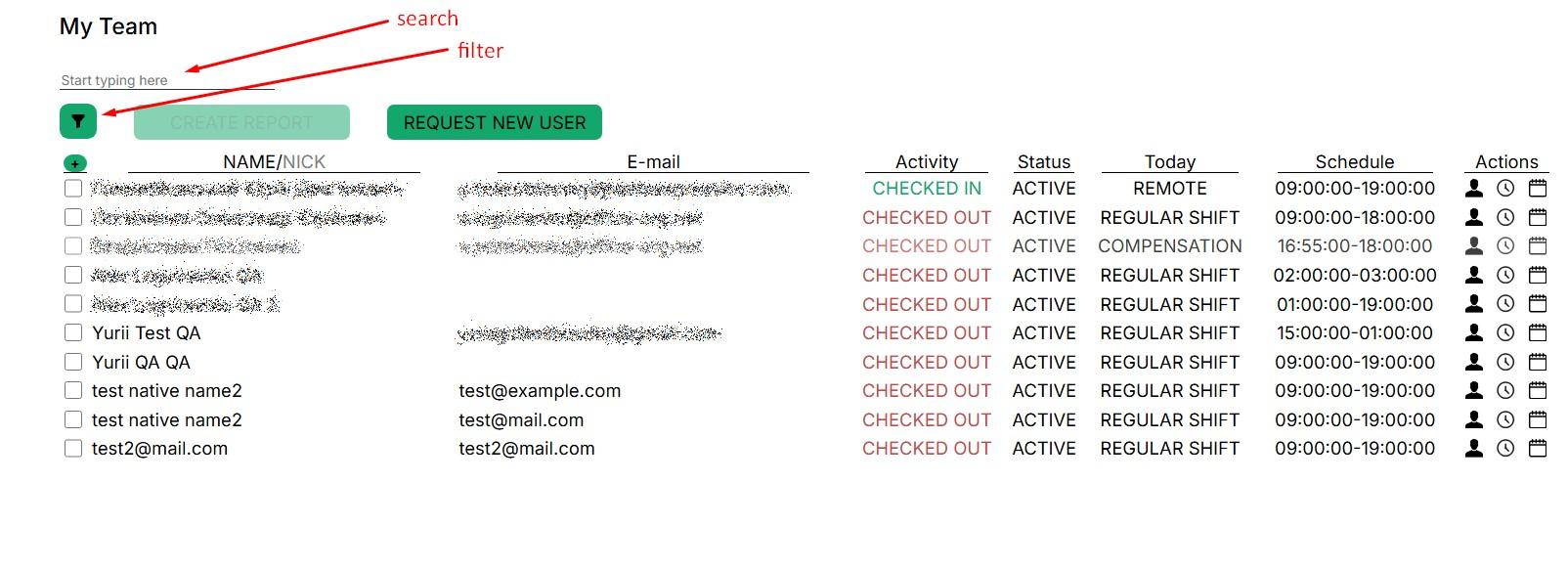
<span style="font-size: 12pt; font-family: Arial,sans-serif; color: #000000; background-color: transparent; font-weight: 400; font-style: normal; font-variant: normal; text-decoration: none; vertical-align: baseline; white-space: pre-wrap;">If the team is large, the easiest way is to use the search field. The search is performed on any user data from the profile (name, nickname, email). Just enter a few characters, and the system will start looking for matches.You can select a user from the provided list of commands</span>

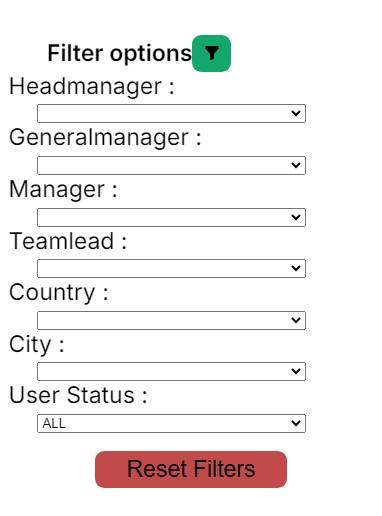
<span style="font-size: 12pt; font-family: Arial,sans-serif; color: #000000; background-color: transparent; font-weight: 400; font-style: normal; font-variant: normal; text-decoration: none; vertical-align: baseline; white-space: pre-wrap;">Or you can use the filter to filter the list of contractors by selected parameters..</span>

[![](https://mngrman.a-tracker.net/uploads/images/gallery/2025-02/scaled-1680-/image-1740133040146.jpg)](https://mngrman.a-tracker.net/uploads/images/gallery/2025-02/image-1740133040146.jpg) [![](https://mngrman.a-tracker.net/uploads/images/gallery/2025-02/scaled-1680-/image-1740133303432.jpg)](https://mngrman.a-tracker.net/uploads/images/gallery/2025-02/image-1740133303432.jpg)
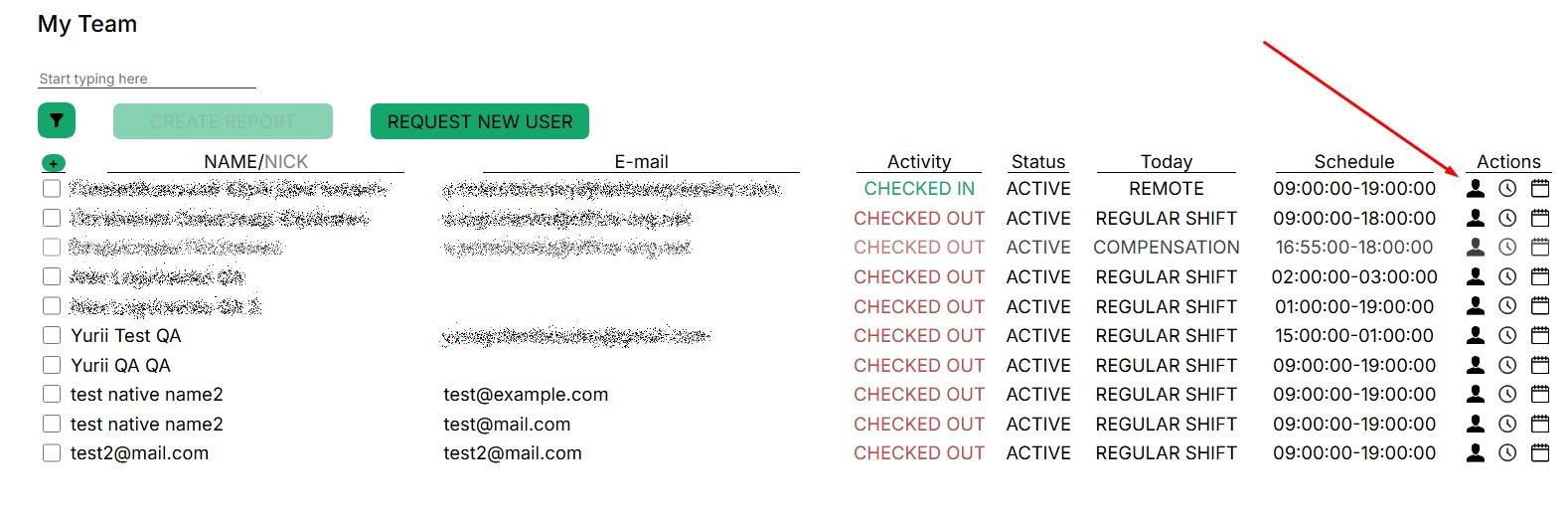
<span style="font-size: 12pt; font-family: Arial,sans-serif; color: #000000; background-color: transparent; font-weight: 400; font-style: normal; font-variant: normal; text-decoration: none; vertical-align: baseline; white-space: pre-wrap;">To view the profile of the selected user or additional menu, press the required button; a window with detailed information will open.</span>

[![](https://mngrman.a-tracker.net/uploads/images/gallery/2025-02/scaled-1680-/image-1740133395067.jpg)](https://mngrman.a-tracker.net/uploads/images/gallery/2025-02/image-1740133395067.jpg)

# “User profile” window.

[![](https://mngrman.a-tracker.net/uploads/images/gallery/2025-02/scaled-1680-/image-1740136827995.jpg)](https://mngrman.a-tracker.net/uploads/images/gallery/2025-02/image-1740136827995.jpg)

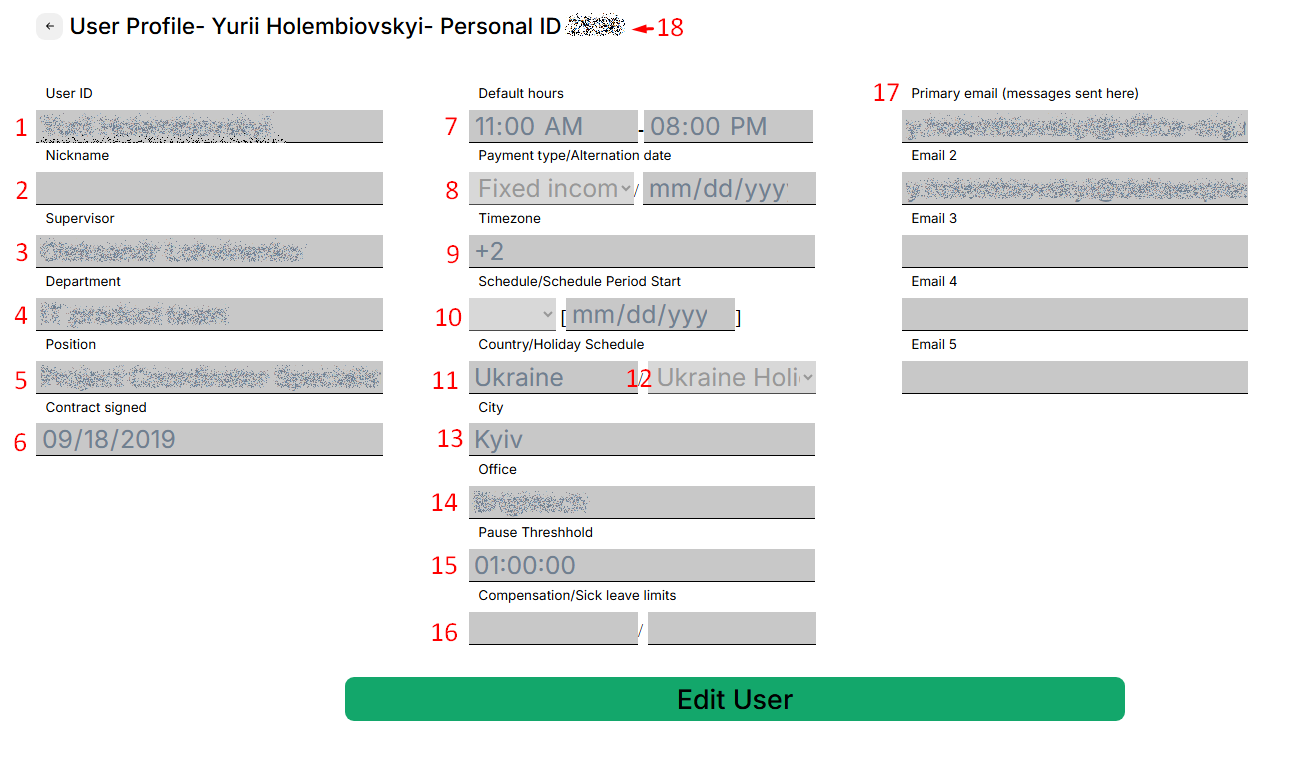
<span style="font-size: 12pt; font-family: Arial,sans-serif; color: #000000; background-color: transparent; font-weight: 400; font-style: normal; font-variant: normal; text-decoration: none; vertical-align: baseline; white-space: pre-wrap;">This section contains basic information about the user profile that has been added to the Action Tracker system.</span>

[![](https://mngrman.a-tracker.net/uploads/images/gallery/2025-09/scaled-1680-/image-1757667106677.png)](https://mngrman.a-tracker.net/uploads/images/gallery/2025-09/image-1757667106677.png)

1. <span style="font-size: 12pt; font-family: Arial,sans-serif; color: #000000; background-color: transparent; font-weight: 400; font-style: normal; font-variant: normal; text-decoration: none; vertical-align: baseline; white-space: pre-wrap;">First and second contractor`s name</span>
2. <span style="font-size: 12pt; font-family: Arial,sans-serif; color: #000000; background-color: transparent; font-weight: 400; font-style: normal; font-variant: normal; text-decoration: none; vertical-align: baseline; white-space: pre-wrap;">assigned nick name</span>
3. <span style="font-size: 12pt; font-family: Arial,sans-serif; color: #000000; background-color: transparent; font-weight: 400; font-style: normal; font-variant: normal; text-decoration: none; vertical-align: baseline; white-space: pre-wrap;">direct supervisor</span>
4. <span style="font-size: 12pt; font-family: Arial,sans-serif; color: #000000; background-color: transparent; font-weight: 400; font-style: normal; font-variant: normal; text-decoration: none; vertical-align: baseline; white-space: pre-wrap;">department</span>
5. <span style="font-size: 12pt; font-family: Arial,sans-serif; color: #000000; background-color: transparent; font-weight: 400; font-style: normal; font-variant: normal; text-decoration: none; vertical-align: baseline; white-space: pre-wrap;">position</span>
6. <span style="font-size: 12pt; font-family: Arial,sans-serif; color: #000000; background-color: transparent; font-weight: 400; font-style: normal; font-variant: normal; text-decoration: none; vertical-align: baseline; white-space: pre-wrap;">contract assigned date</span>
7. <span style="font-size: 12pt; font-family: Arial,sans-serif; color: #000000; background-color: transparent; font-weight: 400; font-style: normal; font-variant: normal; text-decoration: none; vertical-align: baseline; white-space: pre-wrap;">working schedule by business time zone</span>
8. <span style="font-size: 12pt; font-family: Arial,sans-serif; color: #000000; background-color: transparent; font-weight: 400; font-style: normal; font-variant: normal; text-decoration: none; vertical-align: baseline; white-space: pre-wrap;">paymant type: hourly rate/fixed rate</span>
9. <span style="font-size: 12pt; font-family: Arial,sans-serif; color: #000000; background-color: transparent; font-weight: 400; font-style: normal; font-variant: normal; text-decoration: none; vertical-align: baseline; white-space: pre-wrap;">busines time zone</span>
10. <span style="font-size: 12pt; font-family: Arial,sans-serif; color: #000000; background-color: transparent; font-weight: 400; font-style: normal; font-variant: normal; text-decoration: none; vertical-align: baseline; white-space: pre-wrap;">working schedule:weekdays/weekends, schedules`s start date</span>
11. <span style="font-size: 12pt; font-family: Arial,sans-serif; color: #000000; background-color: transparent; font-weight: 400; font-style: normal; font-variant: normal; text-decoration: none; vertical-align: baseline; white-space: pre-wrap;">country</span>
12. <span style="font-size: 12pt; font-family: Arial,sans-serif; color: #000000; background-color: transparent; font-weight: 400; font-style: normal; font-variant: normal; text-decoration: none; vertical-align: baseline; white-space: pre-wrap;">holiday schedule</span>
13. <span style="font-size: 12pt; font-family: Arial,sans-serif; color: #000000; background-color: transparent; font-weight: 400; font-style: normal; font-variant: normal; text-decoration: none; vertical-align: baseline; white-space: pre-wrap;">city</span>
14. <span style="font-size: 12pt; font-family: Arial,sans-serif; color: #000000; background-color: transparent; font-weight: 400; font-style: normal; font-variant: normal; text-decoration: none; vertical-align: baseline; white-space: pre-wrap;">office</span>
15. <span style="font-size: 12pt; font-family: Arial,sans-serif; color: #000000; background-color: transparent; font-weight: 400; font-style: normal; font-variant: normal; text-decoration: none; vertical-align: baseline; white-space: pre-wrap;">fixed lunch time</span>
16. <span style="font-size: 12pt; font-family: Arial,sans-serif; color: #000000; background-color: transparent; font-weight: 400; font-style: normal; font-variant: normal; text-decoration: none; vertical-align: baseline; white-space: pre-wrap;">limit of paid vacation/sick leave days</span>
17. <span style="font-size: 12pt; font-family: Arial,sans-serif; color: #000000; background-color: transparent; font-weight: 400; font-style: normal; font-variant: normal; text-decoration: none; vertical-align: baseline; white-space: pre-wrap;">primary and additional emails </span>
18. <span style="font-size: 12pt; font-family: Arial,sans-serif; color: #000000; background-color: transparent; font-weight: 400; font-style: normal; font-variant: normal; text-decoration: none; vertical-align: baseline; white-space: pre-wrap;">contractor`s personal id </span>

<span style="font-size: 12pt; font-family: Arial,sans-serif; color: #000000; background-color: transparent; font-weight: 400; font-style: normal; font-variant: normal; text-decoration: none; vertical-align: baseline; white-space: pre-wrap;">The manager can see all user information entered into the database. </span><span style="font-size: 12pt; font-family: Arial,sans-serif; color: #000000; background-color: transparent; font-weight: 400; font-style: normal; font-variant: normal; text-decoration: none; vertical-align: baseline; white-space: pre-wrap;">If the information in the profile is incorrect, you need to contact support </span><span style="font-size: 12pt; font-family: Arial,sans-serif; color: #000000; background-color: transparent; font-weight: 400; font-style: normal; font-variant: normal; text-decoration: none; vertical-align: baseline; white-space: pre-wrap;">(email: </span>[<span style="font-size: 12pt; font-family: Arial,sans-serif; color: #1155cc; background-color: transparent; font-weight: 400; font-style: normal; font-variant: normal; text-decoration: underline; -webkit-text-decoration-skip: none; text-decoration-skip-ink: none; vertical-align: baseline; white-space: pre-wrap;">support.team@a-tracker.net</span>](mailto:support.team@a-tracker.net)<span style="font-size: 12pt; font-family: Arial,sans-serif; color: #000000; background-color: transparent; font-weight: 400; font-style: normal; font-variant: normal; text-decoration: none; vertical-align: baseline; white-space: pre-wrap;">), or the manager can make corrections independently.</span>

<span style="font-size: 12pt; font-family: Arial,sans-serif; color: #000000; background-color: transparent; font-weight: 400; font-style: normal; font-variant: normal; text-decoration: none; vertical-align: baseline; white-space: pre-wrap;">To start editing, click the "Edit user" button</span>

[![](https://mngrman.a-tracker.net/uploads/images/gallery/2025-02/scaled-1680-/image-1740142184711.png)](https://mngrman.a-tracker.net/uploads/images/gallery/2025-02/image-1740142184711.png)

<span style="font-size: 12pt; font-family: Arial,sans-serif; color: #000000; background-color: transparent; font-weight: 400; font-style: normal; font-variant: normal; text-decoration: none; vertical-align: baseline; white-space: pre-wrap;">To close the “User profile” window and go back, click the arrow in the upper left corner, as shown in the screenshot. </span>

<span style="font-size: 12pt; font-family: Arial,sans-serif; color: #000000; background-color: transparent; font-weight: 400; font-style: normal; font-variant: normal; text-decoration: none; vertical-align: baseline; white-space: pre-wrap;">To edit a data field you need to point the cursor over the input field or select text you want to edit and perform typing new data.</span>

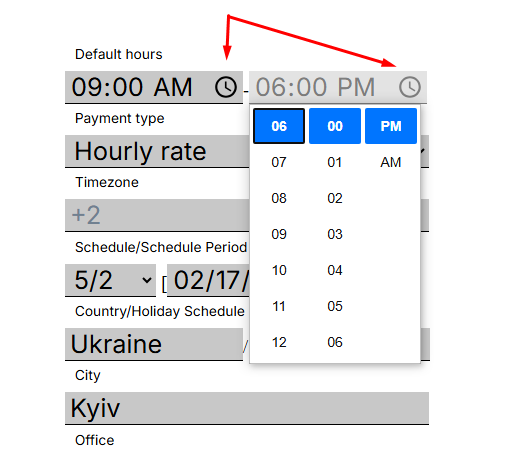
<span style="font-size: 12pt; font-family: Arial,sans-serif; color: #000000; background-color: transparent; font-weight: 400; font-style: normal; font-variant: normal; text-decoration: none; vertical-align: baseline; white-space: pre-wrap;">To change “Schedule” fields simply click on the clock ico and select the correct time.</span>

<span style="font-size: 12pt; font-family: Arial,sans-serif; color: #000000; background-color: transparent; font-weight: bold; font-style: normal; font-variant: normal; text-decoration: none; vertical-align: baseline; white-space: pre-wrap;">(Won’t work in firefox browsers as this feature is not supported by browser. For Firefox browser keyboard input available only)</span>

[![](https://mngrman.a-tracker.net/uploads/images/gallery/2025-02/scaled-1680-/image-1740142719355.png)](https://mngrman.a-tracker.net/uploads/images/gallery/2025-02/image-1740142719355.png)

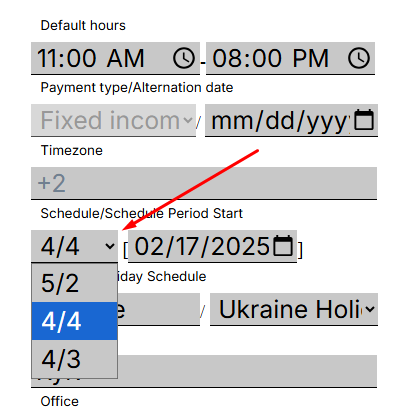
<span style="font-size: 12pt; font-family: Arial,sans-serif; color: #000000; background-color: transparent; font-weight: 400; font-style: normal; font-variant: normal; text-decoration: none; vertical-align: baseline; white-space: pre-wrap;">When editing the "Schedule/schedule period start" schedule, it is important to set the start date of the schedule after selecting a specific schedule</span>

[![](https://mngrman.a-tracker.net/uploads/images/gallery/2025-09/scaled-1680-/image-1757669643972.png)](https://mngrman.a-tracker.net/uploads/images/gallery/2025-09/image-1757669643972.png)

[![](https://mngrman.a-tracker.net/uploads/images/gallery/2025-09/scaled-1680-/image-1757669895440.png)](https://mngrman.a-tracker.net/uploads/images/gallery/2025-09/image-1757669895440.png)
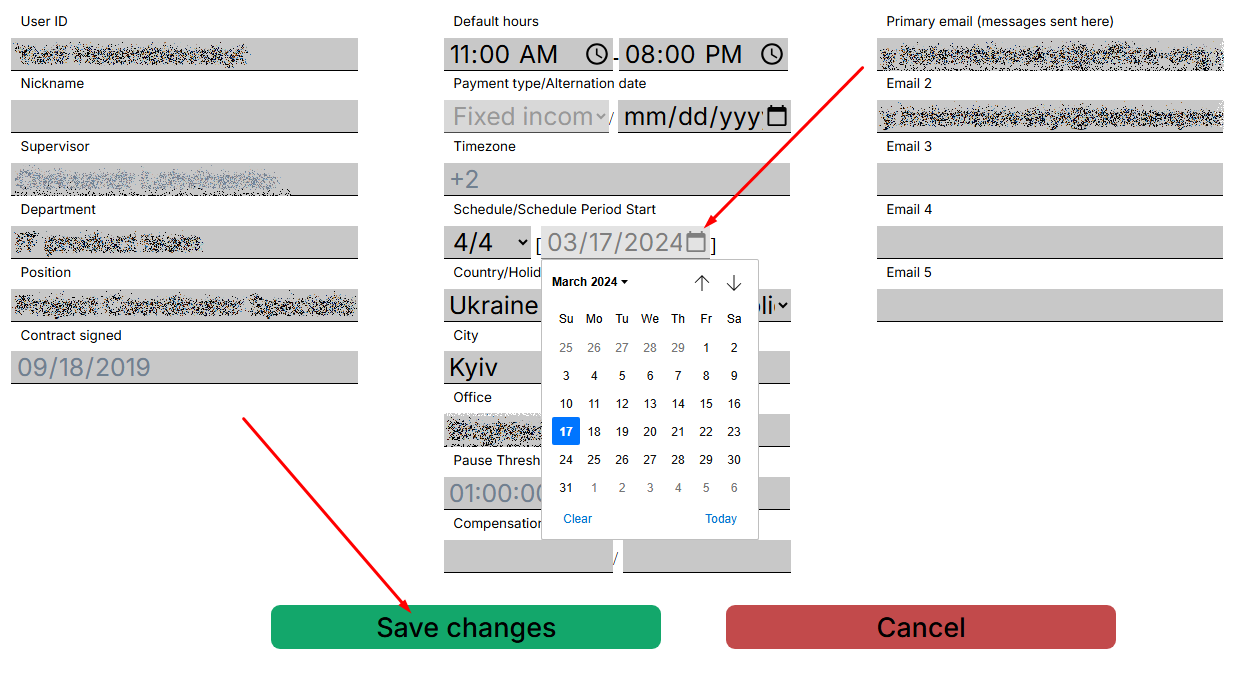

<span style="font-size: 12pt; font-family: Arial,sans-serif; color: #000000; background-color: transparent; font-weight: 400; font-style: normal; font-variant: normal; text-decoration: none; vertical-align: baseline; white-space: pre-wrap;">Make edits and be sure to save the data</span>

[![](https://mngrman.a-tracker.net/uploads/images/gallery/2025-02/scaled-1680-/image-1740383469337.png)](https://mngrman.a-tracker.net/uploads/images/gallery/2025-02/image-1740383469337.png)

<span style="font-size: 12pt; font-family: Arial,sans-serif; color: #000000; background-color: transparent; font-weight: 400; font-style: normal; font-variant: normal; text-decoration: none; vertical-align: baseline; white-space: pre-wrap;">After saving, the changes will be displayed in the calendar</span>

[![](https://mngrman.a-tracker.net/uploads/images/gallery/2025-02/scaled-1680-/image-1740149842541.png)](https://mngrman.a-tracker.net/uploads/images/gallery/2025-02/image-1740149842541.png)

**<span style="font-size: 12pt; font-family: Arial, sans-serif; color: rgb(0, 0, 0); background-color: transparent; font-style: normal; font-variant: normal; text-decoration: none; vertical-align: baseline; white-space: pre-wrap;">Important: a manually set schedule has a higher priority than an automatic schedule.</span>**

<span style="font-size: 12pt; font-family: Arial,sans-serif; color: #000000; background-color: transparent; font-weight: 400; font-style: italic; font-variant: normal; text-decoration: none; vertical-align: baseline; white-space: pre-wrap;">All fields can be edited, except: </span>

<span style="font-size: 12pt; font-family: Arial,sans-serif; color: #000000; background-color: transparent; font-weight: 400; font-style: italic; font-variant: normal; text-decoration: none; vertical-align: baseline; white-space: pre-wrap;">- Timezone,</span>

<span style="font-size: 12pt; font-family: Arial,sans-serif; color: #000000; background-color: transparent; font-weight: 400; font-style: italic; font-variant: normal; text-decoration: none; vertical-align: baseline; white-space: pre-wrap;">- Supervisor,</span>

<span style="font-size: 12pt; font-family: Arial,sans-serif; color: #000000; background-color: transparent; font-weight: 400; font-style: italic; font-variant: normal; text-decoration: none; vertical-align: baseline; white-space: pre-wrap;">- Contract signed.</span>

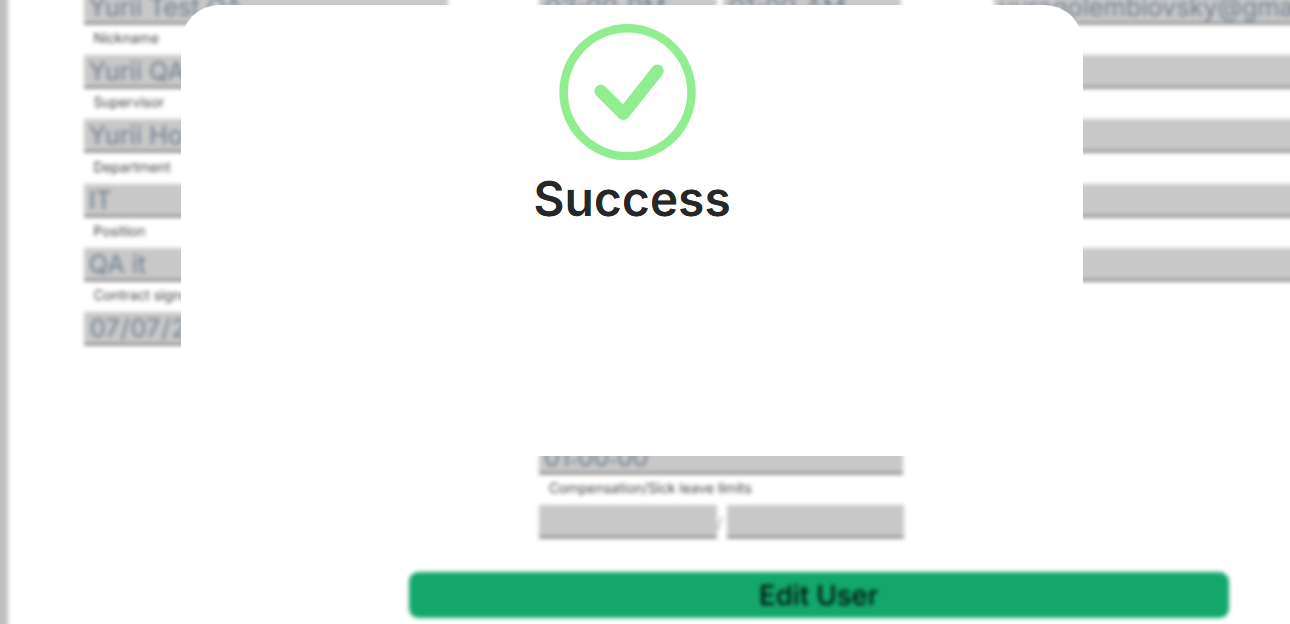
<span style="font-size: 12pt; font-family: Arial,sans-serif; color: #000000; background-color: transparent; font-weight: 400; font-style: normal; font-variant: normal; text-decoration: none; vertical-align: baseline; white-space: pre-wrap;">To save changes, click the "Save changes" button. After saving, the changes will be applied immediately.</span>

<span style="font-size: 11pt; font-family: Arial,sans-serif; color: #000000; background-color: transparent; font-weight: 400; font-style: normal; font-variant: normal; text-decoration: none; vertical-align: baseline; white-space: pre-wrap;">To cancel the changes, click "Cancel" and close the window.</span>

# “Action History” window

[![](https://mngrman.a-tracker.net/uploads/images/gallery/2025-02/scaled-1680-/image-1740384062009.png)](https://mngrman.a-tracker.net/uploads/images/gallery/2025-02/image-1740384062009.png)

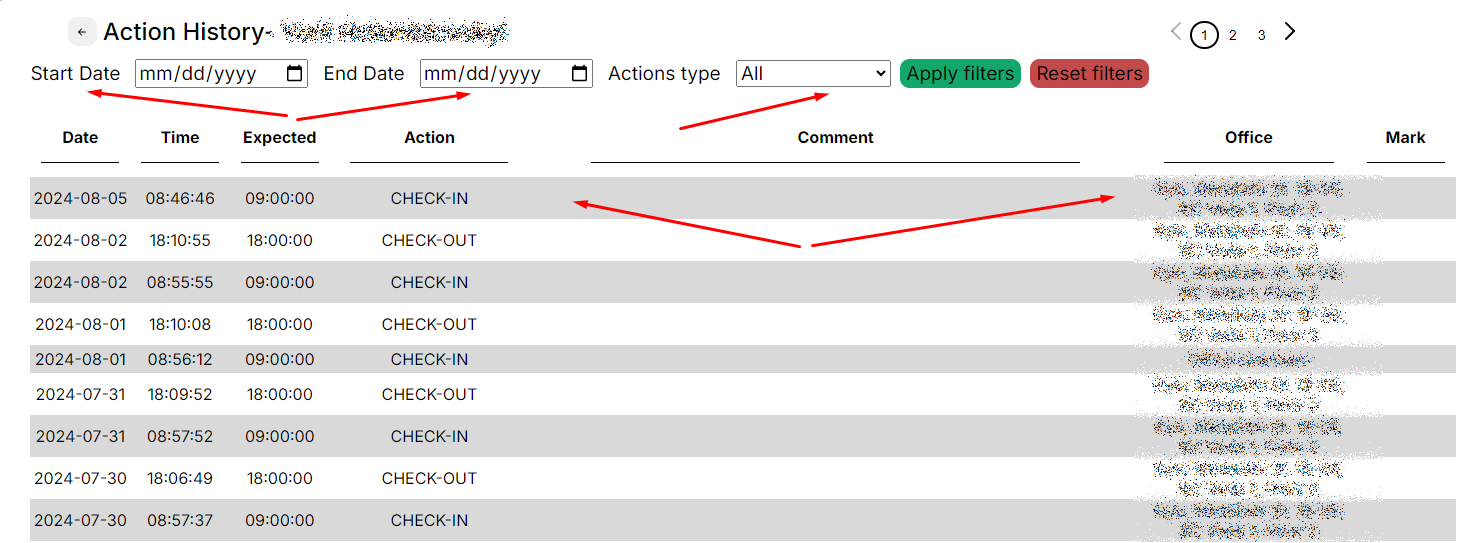
<span style="font-size: 12pt; font-family: Arial,sans-serif; color: #000000; background-color: transparent; font-weight: 400; font-style: normal; font-variant: normal; text-decoration: none; vertical-align: baseline; white-space: pre-wrap;">The selected user’s check-in, check-out, pause start, and pause stop data is accessible from this window. To close the window, press the arrow in the upper left corner.</span>

[![](https://mngrman.a-tracker.net/uploads/images/gallery/2024-08/scaled-1680-/image-1722853942369.png)](https://mngrman.a-tracker.net/uploads/images/gallery/2024-08/image-1722853942369.png)

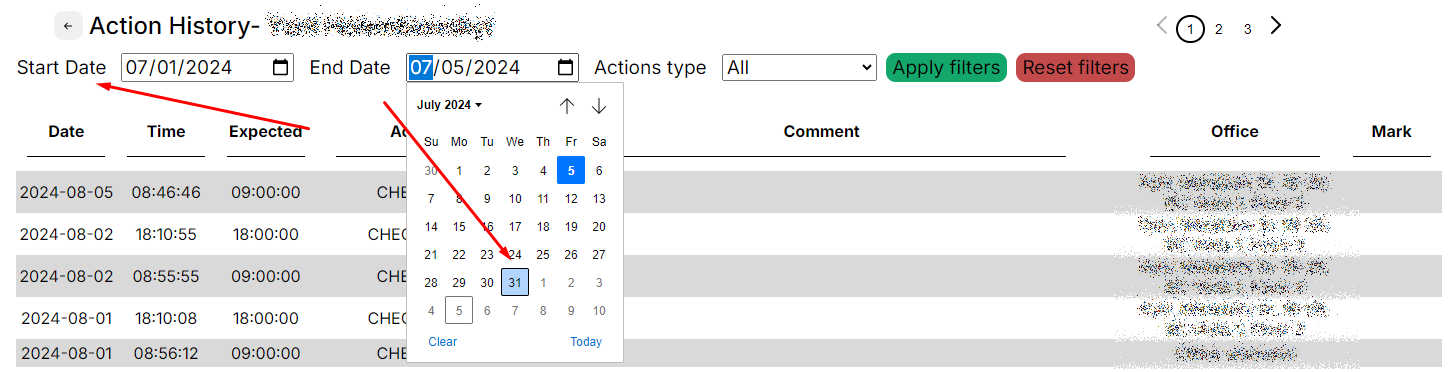
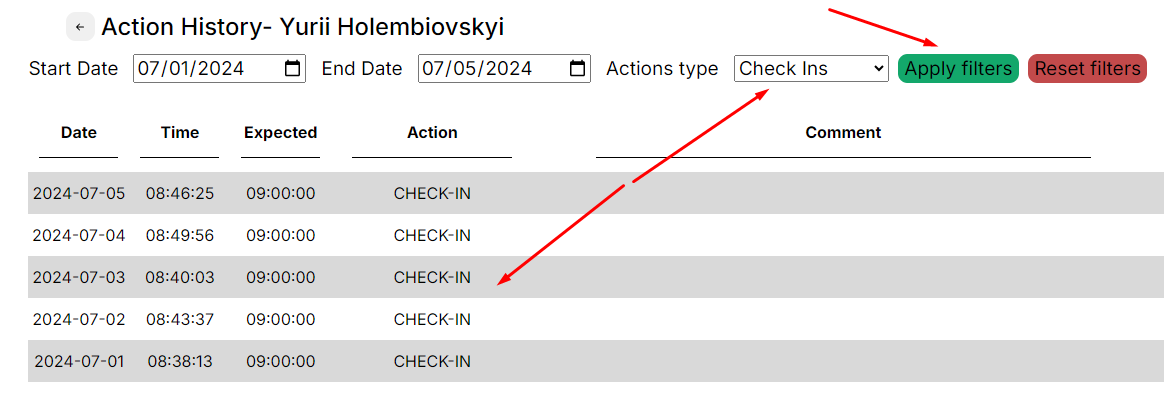
<span style="font-size: 12pt; font-family: Arial,sans-serif; color: #000000; background-color: transparent; font-weight: 400; font-style: normal; font-variant: normal; text-decoration: none; vertical-align: baseline; white-space: pre-wrap;">You can filter events by date by specifying the period of interest and the type of event.</span>

[![](https://mngrman.a-tracker.net/uploads/images/gallery/2024-08/scaled-1680-/image-1722854226542.png)](https://mngrman.a-tracker.net/uploads/images/gallery/2024-08/image-1722854226542.png)

[![](https://mngrman.a-tracker.net/uploads/images/gallery/2024-08/scaled-1680-/image-1722854356635.png)](https://mngrman.a-tracker.net/uploads/images/gallery/2024-08/image-1722854356635.png)
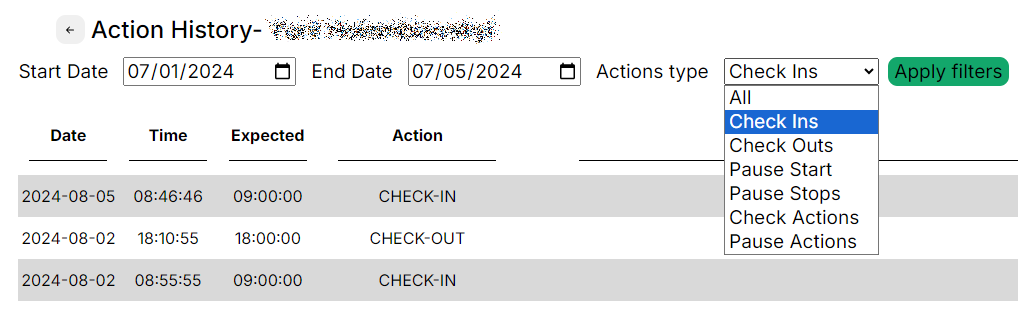

<span style="font-size: 12pt; font-family: Arial,sans-serif; color: #000000; background-color: transparent; font-weight: 400; font-style: normal; font-variant: normal; text-decoration: none; vertical-align: baseline; white-space: pre-wrap;">When the period and type of the event are selected, press the “Filter” button to display the matching values:</span>

[![](https://mngrman.a-tracker.net/uploads/images/gallery/2024-08/scaled-1680-/image-1722854487669.png)](https://mngrman.a-tracker.net/uploads/images/gallery/2024-08/image-1722854487669.png)

<span style="font-weight: normal;">  
</span>

# Schedule window — calendar and work schedule

[![](https://mngrman.a-tracker.net/uploads/images/gallery/2025-02/scaled-1680-/image-1740384180477.png)](https://mngrman.a-tracker.net/uploads/images/gallery/2025-02/image-1740384180477.png)

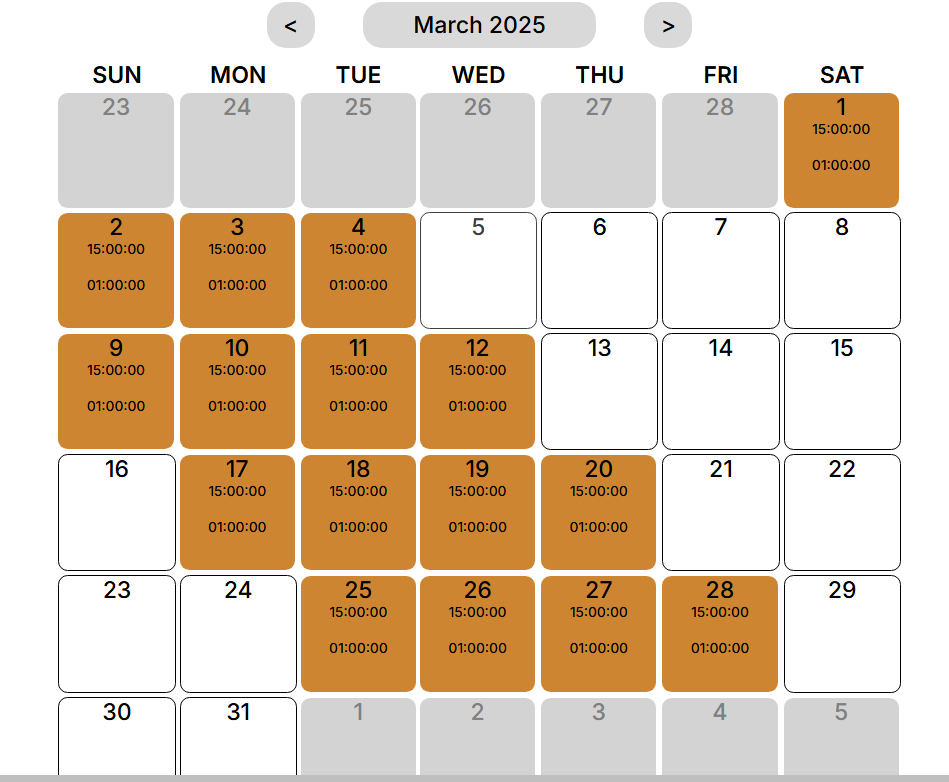
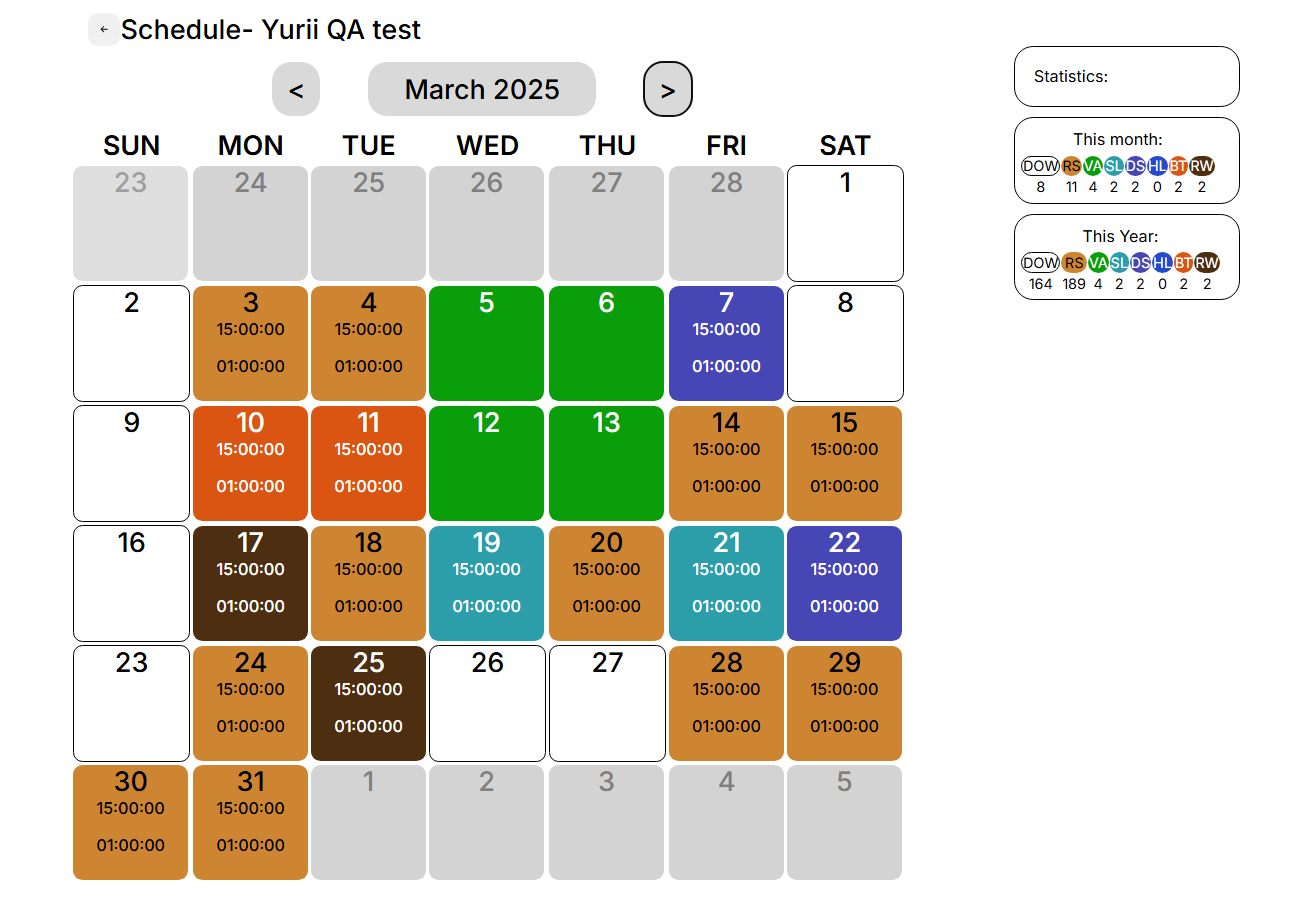
<span style="font-size: 12pt; font-family: Arial,sans-serif; color: #000000; background-color: transparent; font-weight: 400; font-style: normal; font-variant: normal; text-decoration: none; vertical-align: baseline; white-space: pre-wrap;">This window displays a calendar with the selected user’s working schedule marked. The color of each cell fill corresponds to an event. </span><span style="font-size: 12pt; font-family: Arial,sans-serif; color: #000000; background-color: transparent; font-weight: 400; font-style: normal; font-variant: normal; text-decoration: none; vertical-align: baseline; white-space: pre-wrap;">The supervisor can edit the work schedule calendar for the selected user.</span>

[![](https://mngrman.a-tracker.net/uploads/images/gallery/2025-02/scaled-1680-/image-1740395765170.png)](https://mngrman.a-tracker.net/uploads/images/gallery/2025-02/image-1740395765170.png)

<span style="font-size: 12pt; font-family: Arial,sans-serif; color: #000000; background-color: transparent; font-weight: 400; font-style: normal; font-variant: normal; text-decoration: none; vertical-align: baseline; white-space: pre-wrap;">List of events in the calendar:</span>

[![](https://mngrman.a-tracker.net/uploads/images/gallery/2025-02/scaled-1680-/image-1740655597985.png)](https://mngrman.a-tracker.net/uploads/images/gallery/2025-02/image-1740655597985.png)

- <span style="font-size: 12pt; font-family: Arial,sans-serif; color: #000000; background-color: transparent; font-weight: 400; font-style: normal; font-variant: normal; text-decoration: none; vertical-align: baseline; white-space: pre-wrap;">DOW - DayOff/Weekend - absence, unpaid</span>
- <span style="font-size: 12pt; font-family: Arial,sans-serif; color: #000000; background-color: transparent; font-weight: 400; font-style: normal; font-variant: normal; text-decoration: none; vertical-align: baseline; white-space: pre-wrap;">RS - Regular Shift - paid</span>
- <span style="font-size: 12pt; font-family: Arial,sans-serif; color: #000000; background-color: transparent; font-weight: 400; font-style: normal; font-variant: normal; text-decoration: none; vertical-align: baseline; white-space: pre-wrap;">VA - Vacation - absence, paid</span>
- <span style="font-size: 12pt; font-family: Arial,sans-serif; color: #000000; background-color: transparent; font-weight: 400; font-style: normal; font-variant: normal; text-decoration: none; vertical-align: baseline; white-space: pre-wrap;">SL - Sick Leave - absence, paid</span>
- <span style="font-size: 12pt; font-family: Arial,sans-serif; color: #000000; background-color: transparent; font-weight: 400; font-style: normal; font-variant: normal; text-decoration: none; vertical-align: baseline; white-space: pre-wrap;">DS - Duty Shift - paid</span>
- <span style="font-size: 12pt; font-family: Arial,sans-serif; color: #000000; background-color: transparent; font-weight: 400; font-style: normal; font-variant: normal; text-decoration: none; vertical-align: baseline; white-space: pre-wrap;">HL - Holiday - absence, paid</span>
- <span style="font-size: 12pt; font-family: Arial,sans-serif; color: #000000; background-color: transparent; font-weight: 400; font-style: normal; font-variant: normal; text-decoration: none; vertical-align: baseline; white-space: pre-wrap;">BT - Business Trip - paid</span>
- <span style="font-size: 12pt; font-family: Arial,sans-serif; color: #000000; background-color: transparent; font-weight: 400; font-style: normal; font-variant: normal; text-decoration: none; vertical-align: baseline; white-space: pre-wrap;">RW - Remote Work - paid, mark the day of work from home</span>

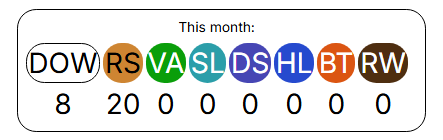
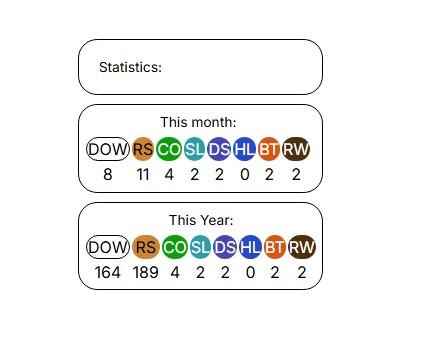
<span style="font-size: 12pt; font-family: Arial,sans-serif; color: #000000; background-color: transparent; font-weight: 400; font-style: normal; font-variant: normal; text-decoration: none; vertical-align: baseline; white-space: pre-wrap;">This menu shows statistics for the selected month and for the calendar year</span>

[![](https://mngrman.a-tracker.net/uploads/images/gallery/2025-02/scaled-1680-/image-1740396830902.jpg)](https://mngrman.a-tracker.net/uploads/images/gallery/2025-02/image-1740396830902.jpg)

<span style="font-size: 12pt; font-family: Arial,sans-serif; color: #000000; background-color: transparent; font-weight: 400; font-style: normal; font-variant: normal; text-decoration: none; vertical-align: baseline; white-space: pre-wrap;">Detailed editing of a user's work schedule is described in the "My team Schedule" section.</span>

# Request new user

[![image.png](https://mngrman.a-tracker.net/uploads/images/gallery/2025-02/scaled-1680-/image.png)](https://mngrman.a-tracker.net/uploads/images/gallery/2025-02/image.png)

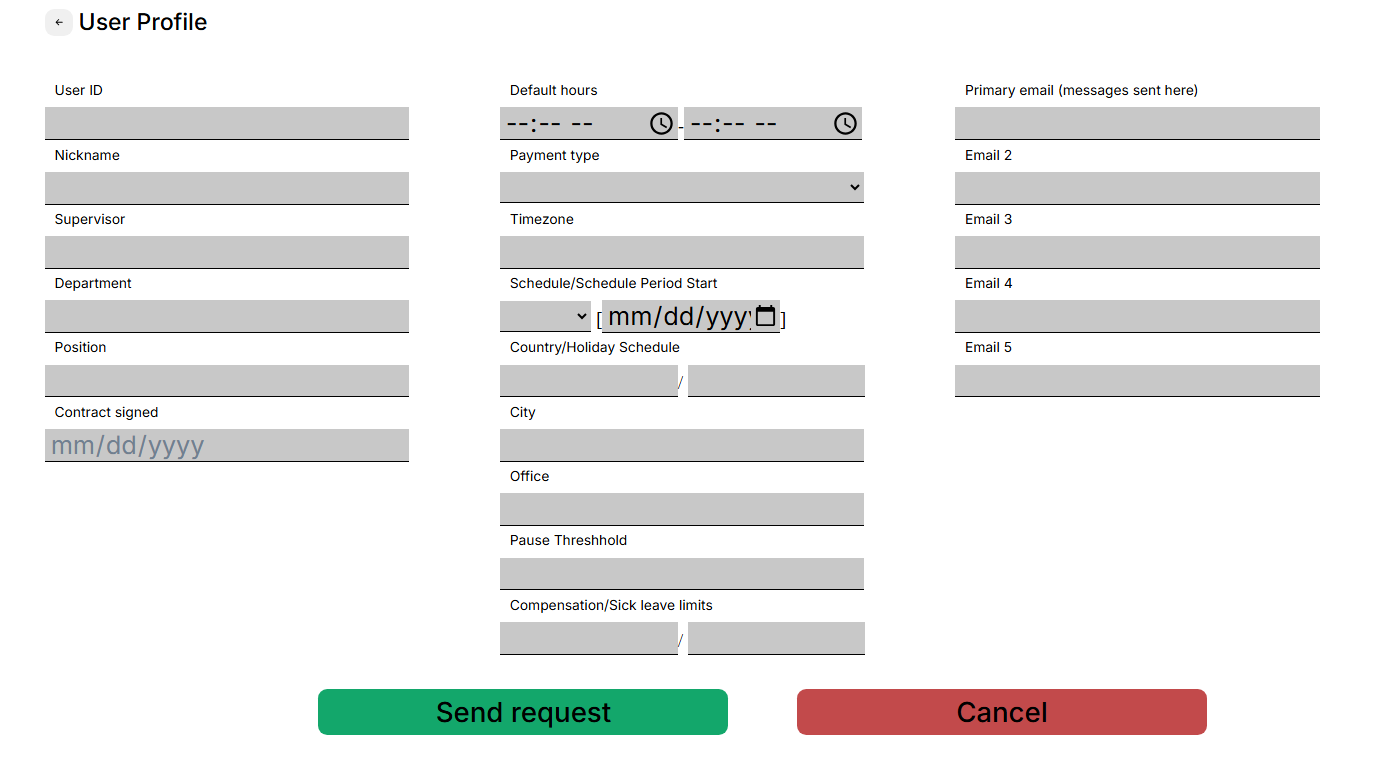
<span style="font-size: 12pt; font-family: Arial,sans-serif; color: #000000; background-color: transparent; font-weight: 400; font-style: normal; font-variant: normal; text-decoration: none; vertical-align: baseline; white-space: pre-wrap;">This menu provides the function of sending a request to add a contractor to the team.</span>

<span style="font-size: 12pt; font-family: Arial,sans-serif; color: #000000; background-color: transparent; font-weight: 400; font-style: normal; font-variant: normal; text-decoration: none; vertical-align: baseline; white-space: pre-wrap;">You need to click the button, then a window with fields to fill in will open.</span>

[![](https://mngrman.a-tracker.net/uploads/images/gallery/2025-02/scaled-1680-/image-1740399339176.png)](https://mngrman.a-tracker.net/uploads/images/gallery/2025-02/image-1740399339176.png)

<span style="font-size: 12pt; font-family: Arial,sans-serif; color: #000000; background-color: transparent; font-weight: 400; font-style: normal; font-variant: normal; text-decoration: none; vertical-align: baseline; white-space: pre-wrap;">Please fill in all the fields as much as possible and click the “Send request” button, the request will be sent to technical support for processing.</span>

# Contractor`s Data correction

<span style="font-size: 12pt; font-family: Arial,sans-serif; color: #000000; background-color: transparent; font-weight: 400; font-style: normal; font-variant: normal; text-decoration: none; vertical-align: baseline; white-space: pre-wrap;">The Action Tracker system implements the functionality of making adjustments to the activity of contractors who are added to the team.</span>

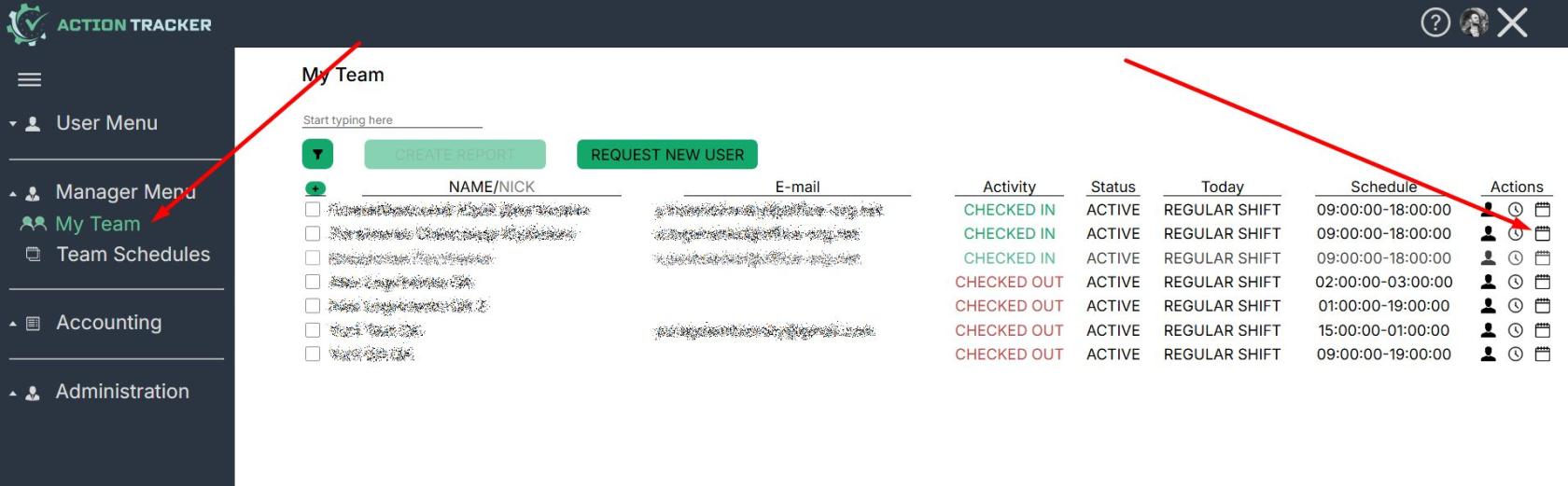
<span style="font-size: 12pt; font-family: Arial,sans-serif; color: #000000; background-color: transparent; font-weight: 400; font-style: normal; font-variant: normal; text-decoration: none; vertical-align: baseline; white-space: pre-wrap;">To start making adjustments, you need to go to “My team”, find the right contractor and open their calendar.</span>

[![](https://mngrman.a-tracker.net/uploads/images/gallery/2025-02/scaled-1680-/image-1740482745179.jpg)](https://mngrman.a-tracker.net/uploads/images/gallery/2025-02/image-1740482745179.jpg)

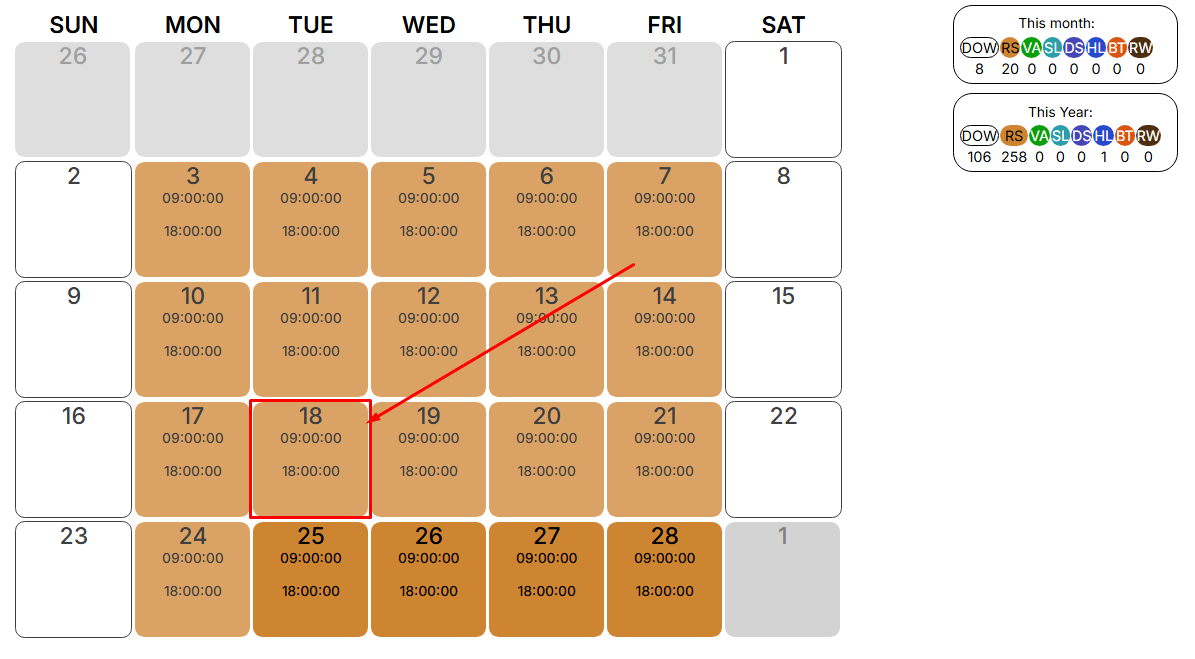
<span style="font-size: 12pt; font-family: Arial,sans-serif; color: #000000; background-color: transparent; font-weight: 400; font-style: normal; font-variant: normal; text-decoration: none; vertical-align: baseline; white-space: pre-wrap;">In the calendar, find the desired day, click on it.</span>

[![](https://mngrman.a-tracker.net/uploads/images/gallery/2025-02/scaled-1680-/image-1740490566063.png)](https://mngrman.a-tracker.net/uploads/images/gallery/2025-02/image-1740490566063.png)

<span style="font-size: 12pt; font-family: Arial,sans-serif; color: #000000; background-color: transparent; font-weight: 400; font-style: normal; font-variant: normal; text-decoration: none; vertical-align: baseline; white-space: pre-wrap;">A window opens with the parameters that can be edited. Click the “EDIT” button, the fields that can be edited are highlighted.</span>

[![](https://mngrman.a-tracker.net/uploads/images/gallery/2025-02/scaled-1680-/image-1740495946375.png)](https://mngrman.a-tracker.net/uploads/images/gallery/2025-02/image-1740495946375.png)

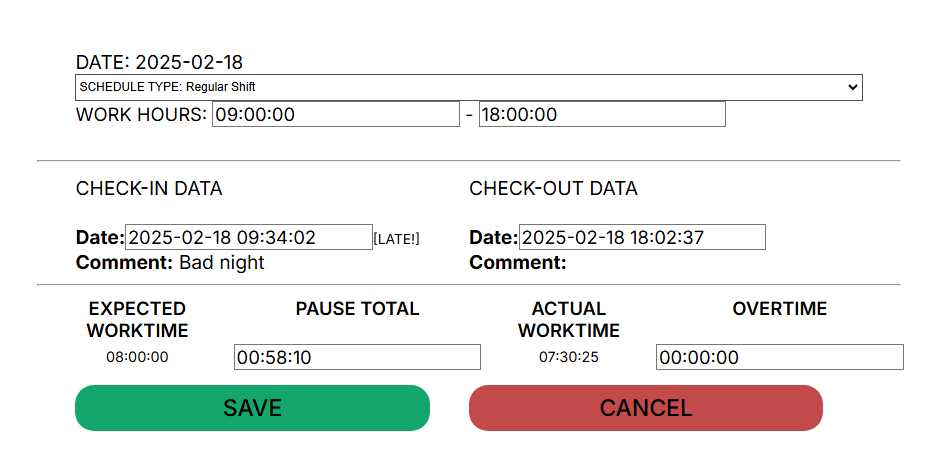
<span style="font-size: 12pt; font-family: Arial,sans-serif; color: #000000; background-color: transparent; font-weight: 400; font-style: normal; font-variant: normal; text-decoration: none; vertical-align: baseline; white-space: pre-wrap;">The following fields are available for correcting and entering data:</span>

- <span style="font-size: 12pt; font-family: Arial,sans-serif; color: #000000; background-color: transparent; font-weight: 400; font-style: normal; font-variant: normal; text-decoration: none; vertical-align: baseline; white-space: pre-wrap;">Schedule Type</span>

[![](https://mngrman.a-tracker.net/uploads/images/gallery/2025-02/scaled-1680-/image-1740496586489.png)](https://mngrman.a-tracker.net/uploads/images/gallery/2025-02/image-1740496586489.png)

- <span style="font-size: 12pt; font-family: Arial,sans-serif; color: #000000; background-color: transparent; font-weight: 400; font-style: normal; font-variant: normal; text-decoration: none; vertical-align: baseline; white-space: pre-wrap;">Work Hours - work hours of reverse day employment</span>
- <span style="font-size: 12pt; font-family: Arial,sans-serif; color: #000000; background-color: transparent; font-weight: 400; font-style: normal; font-variant: normal; text-decoration: none; vertical-align: baseline; white-space: pre-wrap;">Check-in/Check-out Data</span>
- <span style="font-size: 12pt; font-family: Arial,sans-serif; color: #000000; background-color: transparent; font-weight: 400; font-style: normal; font-variant: normal; text-decoration: none; vertical-align: baseline; white-space: pre-wrap;">Pause Total</span>
- <span style="font-size: 12pt; font-family: Arial,sans-serif; color: #000000; background-color: transparent; font-weight: 400; font-style: normal; font-variant: normal; text-decoration: none; vertical-align: baseline; white-space: pre-wrap;">Overtime</span>

<span style="font-size: 12pt; font-family: Arial,sans-serif; color: #000000; background-color: transparent; font-weight: 400; font-style: normal; font-variant: normal; text-decoration: none; vertical-align: baseline; white-space: pre-wrap;">To save the corrected data, click the “Save” button. After saving the corrected data, the system will recalculate the hours.</span>

<span style="font-size: 12pt; font-family: Arial,sans-serif; color: #000000; background-color: transparent; font-weight: 400; font-style: normal; font-variant: normal; text-decoration: none; vertical-align: baseline; white-space: pre-wrap;">When generating a report, the corrected data will be used and a mark will be set on the adjustments made.</span>

<span style="font-size: 12pt; font-family: Arial,sans-serif; color: #000000; background-color: transparent; font-weight: 400; font-style: normal; font-variant: normal; text-decoration: none; vertical-align: baseline; white-space: pre-wrap;">Schedule Types:</span>

[![](https://mngrman.a-tracker.net/uploads/images/gallery/2025-02/scaled-1680-/image-1740655597985.png)](https://mngrman.a-tracker.net/uploads/images/gallery/2025-02/image-1740655597985.png)

- <span style="font-size: 12pt; font-family: Arial,sans-serif; color: #000000; background-color: transparent; font-weight: 400; font-style: normal; font-variant: normal; text-decoration: none; vertical-align: baseline; white-space: pre-wrap;">DOW - DayOff/Weekend - absence, unpaid</span>
- <span style="font-size: 12pt; font-family: Arial,sans-serif; color: #000000; background-color: transparent; font-weight: 400; font-style: normal; font-variant: normal; text-decoration: none; vertical-align: baseline; white-space: pre-wrap;">RS - Regular Shift - paid</span>
- <span style="font-size: 12pt; font-family: Arial,sans-serif; color: #000000; background-color: transparent; font-weight: 400; font-style: normal; font-variant: normal; text-decoration: none; vertical-align: baseline; white-space: pre-wrap;">VA - Vacation - absence, paid</span>
- <span style="font-size: 12pt; font-family: Arial,sans-serif; color: #000000; background-color: transparent; font-weight: 400; font-style: normal; font-variant: normal; text-decoration: none; vertical-align: baseline; white-space: pre-wrap;">SL - Sick Leave - absence, paid</span>
- <span style="font-size: 12pt; font-family: Arial,sans-serif; color: #000000; background-color: transparent; font-weight: 400; font-style: normal; font-variant: normal; text-decoration: none; vertical-align: baseline; white-space: pre-wrap;">DS - Duty Shift - paid</span>
- <span style="font-size: 12pt; font-family: Arial,sans-serif; color: #000000; background-color: transparent; font-weight: 400; font-style: normal; font-variant: normal; text-decoration: none; vertical-align: baseline; white-space: pre-wrap;">HL - Holiday - absence, paid</span>
- <span style="font-size: 12pt; font-family: Arial,sans-serif; color: #000000; background-color: transparent; font-weight: 400; font-style: normal; font-variant: normal; text-decoration: none; vertical-align: baseline; white-space: pre-wrap;">BT - Business Trip - paid</span>
- <span style="font-size: 12pt; font-family: Arial,sans-serif; color: #000000; background-color: transparent; font-weight: 400; font-style: normal; font-variant: normal; text-decoration: none; vertical-align: baseline; white-space: pre-wrap;">RW - Remote Work - paid, mark the day of work from home</span>

**<span style="font-size: 12pt; font-family: Arial, sans-serif; color: rgb(0, 0, 0); background-color: transparent; font-style: normal; font-variant: normal; text-decoration: none; vertical-align: baseline; white-space: pre-wrap;">Important! You can only correct data for previous periods. </span>**

**<span style="font-size: 12pt; font-family: Arial, sans-serif; color: rgb(0, 0, 0); background-color: transparent; font-style: normal; font-variant: normal; text-decoration: none; vertical-align: baseline; white-space: pre-wrap;">Supervisor cannot change the data himself.</span>**

**<span style="font-size: 12pt; font-family: Arial, sans-serif; color: rgb(0, 0, 0); background-color: transparent; font-style: normal; font-variant: normal; text-decoration: none; vertical-align: baseline; white-space: pre-wrap;">You can only edit existing data: Check-in/Check-out.</span>**

# Change in payment type Hourly rate/Fixed income

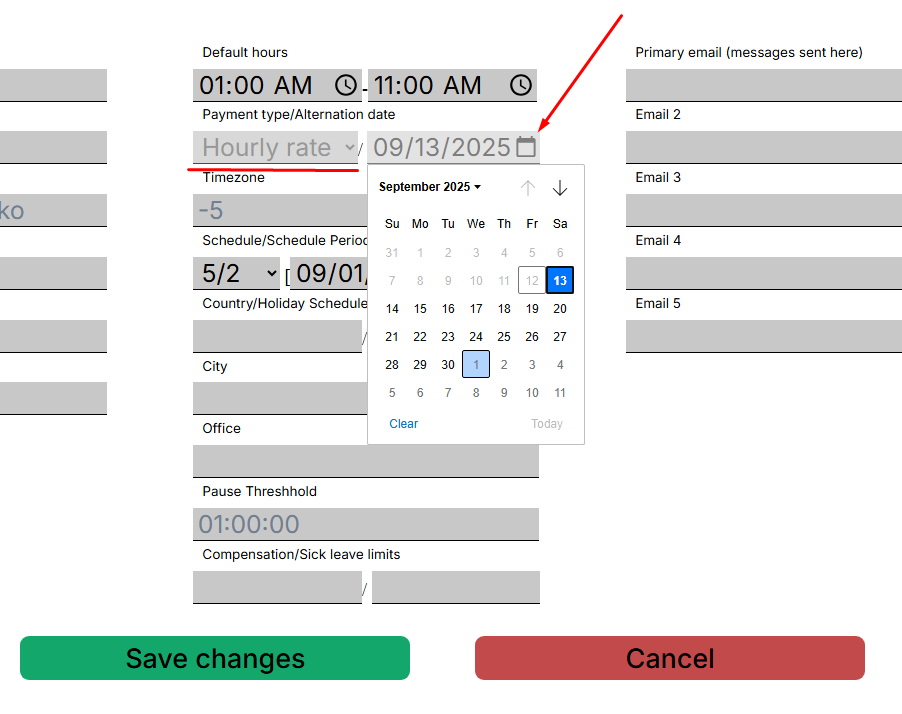
The Action Tracker system allows you to change the payment type in the contractor's profile to Hourly rate/Fixed income.

To change the payment type, open the profile of the relevant contractor, click on the date selection button - “Alternation date” and save the changes.

When the selected date arrives, the Action Tracker system will change the payment type for the contractor, after which reports will be calculated according to the corresponding algorithm for calculating working hours.

[![image.png](https://mngrman.a-tracker.net/uploads/images/gallery/2025-09/scaled-1680-/image.png)](https://mngrman.a-tracker.net/uploads/images/gallery/2025-09/image.png)