# My Team Schedules


# Overview

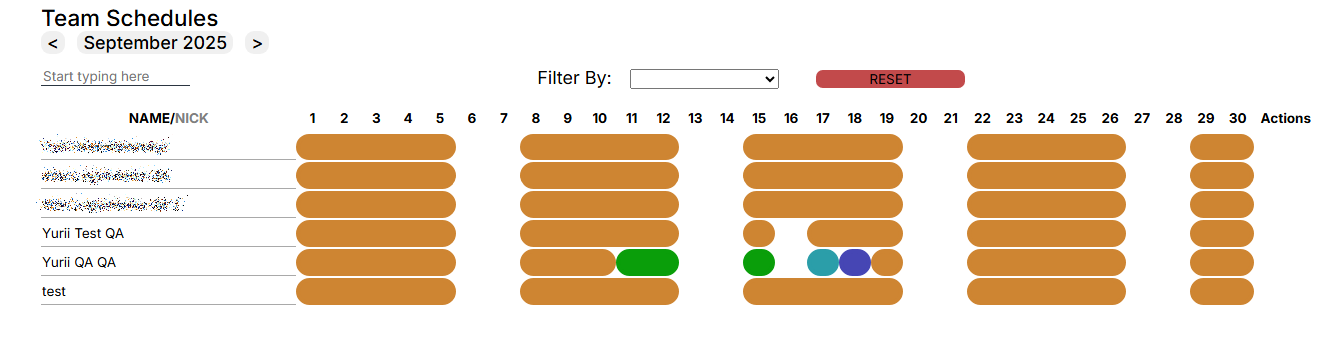
<span style="font-size: 12pt; font-family: Arial,sans-serif; color: #000000; background-color: transparent; font-weight: 400; font-style: normal; font-variant: normal; text-decoration: none; vertical-align: baseline; white-space: pre-wrap;">The My Team Schedules section is designed to view and control the schedule of the entire team.</span>

[![](https://mngrman.a-tracker.net/uploads/images/gallery/2024-08/scaled-1680-/image-1722850153467.png)](https://mngrman.a-tracker.net/uploads/images/gallery/2024-08/image-1722850153467.png)

[![](https://mngrman.a-tracker.net/uploads/images/gallery/2025-09/scaled-1680-/image-1757680574772.png)](https://mngrman.a-tracker.net/uploads/images/gallery/2025-09/image-1757680574772.png)

<span style="font-size: 12pt; font-family: Arial,sans-serif; color: #000000; background-color: transparent; font-weight: 400; font-style: normal; font-variant: normal; text-decoration: none; vertical-align: baseline; white-space: pre-wrap;">In this section, the manager can:</span>

<span style="font-size: 12pt; font-family: Arial,sans-serif; color: #000000; background-color: transparent; font-weight: 400; font-style: normal; font-variant: normal; text-decoration: none; vertical-align: baseline; white-space: pre-wrap;">- View the list of team members.</span>

<span style="font-size: 12pt; font-family: Arial,sans-serif; color: #000000; background-color: transparent; font-weight: 400; font-style: normal; font-variant: normal; text-decoration: none; vertical-align: baseline; white-space: pre-wrap;">- Check the schedules established for the team.</span>

<span style="font-size: 12pt; font-family: Arial,sans-serif; color: #000000; background-color: transparent; font-weight: 400; font-style: normal; font-variant: normal; text-decoration: none; vertical-align: baseline; white-space: pre-wrap;">- See who made the changes to the work schedule and is waiting for approval.</span>

<span style="font-size: 12pt; font-family: Arial,sans-serif; color: #000000; background-color: transparent; font-weight: 400; font-style: normal; font-variant: normal; text-decoration: none; vertical-align: baseline; white-space: pre-wrap;">- View statistics for a selected contractor.</span>

<span style="font-size: 12pt; font-family: Arial,sans-serif; color: #000000; background-color: transparent; font-weight: 400; font-style: normal; font-variant: normal; text-decoration: none; vertical-align: baseline; white-space: pre-wrap;">- Change work schedule. </span>

<span style="font-size: 12pt; font-family: Arial,sans-serif; color: #000000; background-color: transparent; font-weight: 400; font-style: normal; font-variant: normal; text-decoration: none; vertical-align: baseline; white-space: pre-wrap;">- Set holidays in the schedule. </span>


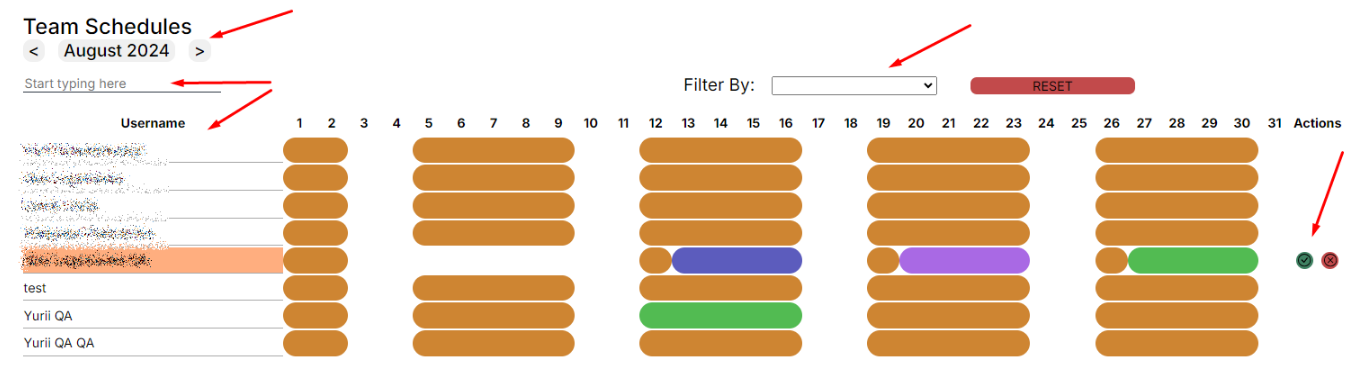
<span style="font-size: 14pt; font-family: Arial,sans-serif; color: #000000; background-color: transparent; font-weight: 400; font-style: normal; font-variant: normal; text-decoration: none; vertical-align: baseline; white-space: pre-wrap;">Team Schedule Window. </span>


[![](https://mngrman.a-tracker.net/uploads/images/gallery/2025-09/scaled-1680-/image-1757680756936.png)](https://mngrman.a-tracker.net/uploads/images/gallery/2025-09/image-1757680756936.png)

<span style="font-size: 12pt; font-family: Arial,sans-serif; color: #000000; background-color: transparent; font-weight: 400; font-style: normal; font-variant: normal; text-decoration: none; vertical-align: baseline; white-space: pre-wrap;">- displayed month,</span>

<span style="font-size: 12pt; font-family: Arial,sans-serif; color: #000000; background-color: transparent; font-weight: 400; font-style: normal; font-variant: normal; text-decoration: none; vertical-align: baseline; white-space: pre-wrap;">- list of team members,</span>

<span style="font-size: 12pt; font-family: Arial,sans-serif; color: #000000; background-color: transparent; font-weight: 400; font-style: normal; font-variant: normal; text-decoration: none; vertical-align: baseline; white-space: pre-wrap;">- search in the team,</span>

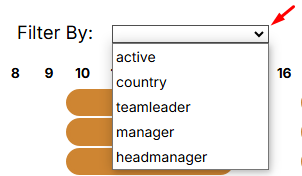
<span style="font-size: 12pt; font-family: Arial,sans-serif; color: #000000; background-color: transparent; font-weight: 400; font-style: normal; font-variant: normal; text-decoration: none; vertical-align: baseline; white-space: pre-wrap;">- filter By,</span>

[![](https://mngrman.a-tracker.net/uploads/images/gallery/2025-02/scaled-1680-/image-1740567332433.png)](https://mngrman.a-tracker.net/uploads/images/gallery/2025-02/image-1740567332433.png)

<span style="font-size: 12pt; font-family: Arial,sans-serif; color: #000000; background-color: transparent; font-weight: 400; font-style: normal; font-variant: normal; text-decoration: none; vertical-align: baseline; white-space: pre-wrap;">- calendar,</span>

<span style="font-size: 12pt; font-family: Arial,sans-serif; color: #000000; background-color: transparent; font-weight: 400; font-style: normal; font-variant: normal; text-decoration: none; vertical-align: baseline; white-space: pre-wrap;">- actions — actions of the user awaiting the approval of schedule changes.</span>

<span style="font-size: 12pt; font-family: Arial,sans-serif; color: #000000; background-color: transparent; font-weight: 400; font-style: normal; font-variant: normal; text-decoration: none; vertical-align: baseline; white-space: pre-wrap;">- Set Holiday - button to add Holiday (day off).</span>

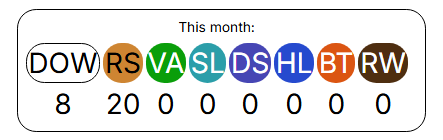
<span style="font-size: 12pt; font-family: Arial,sans-serif; color: #000000; background-color: transparent; font-weight: 400; font-style: normal; font-variant: normal; text-decoration: none; vertical-align: baseline; white-space: pre-wrap;">List of events in the calendar:</span>

[![](https://mngrman.a-tracker.net/uploads/images/gallery/2025-02/scaled-1680-/image-1740655597985.png)](https://mngrman.a-tracker.net/uploads/images/gallery/2025-02/image-1740655597985.png)

- <span style="font-size: 12pt; font-family: Arial,sans-serif; color: #000000; background-color: transparent; font-weight: 400; font-style: normal; font-variant: normal; text-decoration: none; vertical-align: baseline; white-space: pre-wrap;">DOW - DayOff/Weekend - absence, unpaid</span>
- <span style="font-size: 12pt; font-family: Arial,sans-serif; color: #000000; background-color: transparent; font-weight: 400; font-style: normal; font-variant: normal; text-decoration: none; vertical-align: baseline; white-space: pre-wrap;">RS - Regular Shift - paid</span>
- <span style="font-size: 12pt; font-family: Arial,sans-serif; color: #000000; background-color: transparent; font-weight: 400; font-style: normal; font-variant: normal; text-decoration: none; vertical-align: baseline; white-space: pre-wrap;">VA - Vacation - absence, paid</span>
- <span style="font-size: 12pt; font-family: Arial,sans-serif; color: #000000; background-color: transparent; font-weight: 400; font-style: normal; font-variant: normal; text-decoration: none; vertical-align: baseline; white-space: pre-wrap;">SL - Sick Leave - absence, paid</span>
- <span style="font-size: 12pt; font-family: Arial,sans-serif; color: #000000; background-color: transparent; font-weight: 400; font-style: normal; font-variant: normal; text-decoration: none; vertical-align: baseline; white-space: pre-wrap;">DS - Duty Shift - paid</span>
- <span style="font-size: 12pt; font-family: Arial,sans-serif; color: #000000; background-color: transparent; font-weight: 400; font-style: normal; font-variant: normal; text-decoration: none; vertical-align: baseline; white-space: pre-wrap;">HL - Holiday - absence, paid</span>
- <span style="font-size: 12pt; font-family: Arial,sans-serif; color: #000000; background-color: transparent; font-weight: 400; font-style: normal; font-variant: normal; text-decoration: none; vertical-align: baseline; white-space: pre-wrap;">BT - Business Trip - paid</span>
- <span style="font-size: 12pt; font-family: Arial,sans-serif; color: #000000; background-color: transparent; font-weight: 400; font-style: normal; font-variant: normal; text-decoration: none; vertical-align: baseline; white-space: pre-wrap;">RW - Remote Work - paid, mark the day of work from home</span>

# Working with Team Schedule

<span style="font-size: 12pt; font-family: Arial,sans-serif; color: #000000; background-color: transparent; font-weight: 400; font-style: normal; font-variant: normal; text-decoration: none; vertical-align: baseline; white-space: pre-wrap;">The manager will see the list of members of their team for a calendar month (current month by default).</span>

<span style="font-size: 12pt; font-family: Arial,sans-serif; color: #000000; background-color: transparent; font-weight: 400; font-style: normal; font-variant: normal; text-decoration: none; vertical-align: baseline; white-space: pre-wrap;">- Users who have made changes to their work schedule will be highlighted in red, and the manager can approve or reject changes as shown in the screenshot below:</span>

[![](https://mngrman.a-tracker.net/uploads/images/gallery/2025-09/scaled-1680-/image-1757680869729.png)](https://mngrman.a-tracker.net/uploads/images/gallery/2025-09/image-1757680869729.png)

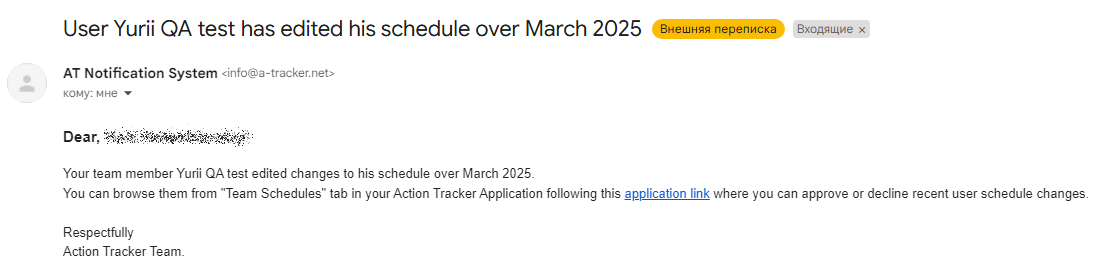
<span style="font-size: 12pt; font-family: Arial,sans-serif; color: #000000; background-color: transparent; font-weight: 400; font-style: normal; font-variant: normal; text-decoration: none; vertical-align: baseline; white-space: pre-wrap;">- Also, the Action Tracker system will send a notification to the manager's email (primary email) about the changes made by the team member</span>

[![](https://mngrman.a-tracker.net/uploads/images/gallery/2025-02/scaled-1680-/image-1740650124651.png)](https://mngrman.a-tracker.net/uploads/images/gallery/2025-02/image-1740650124651.png)

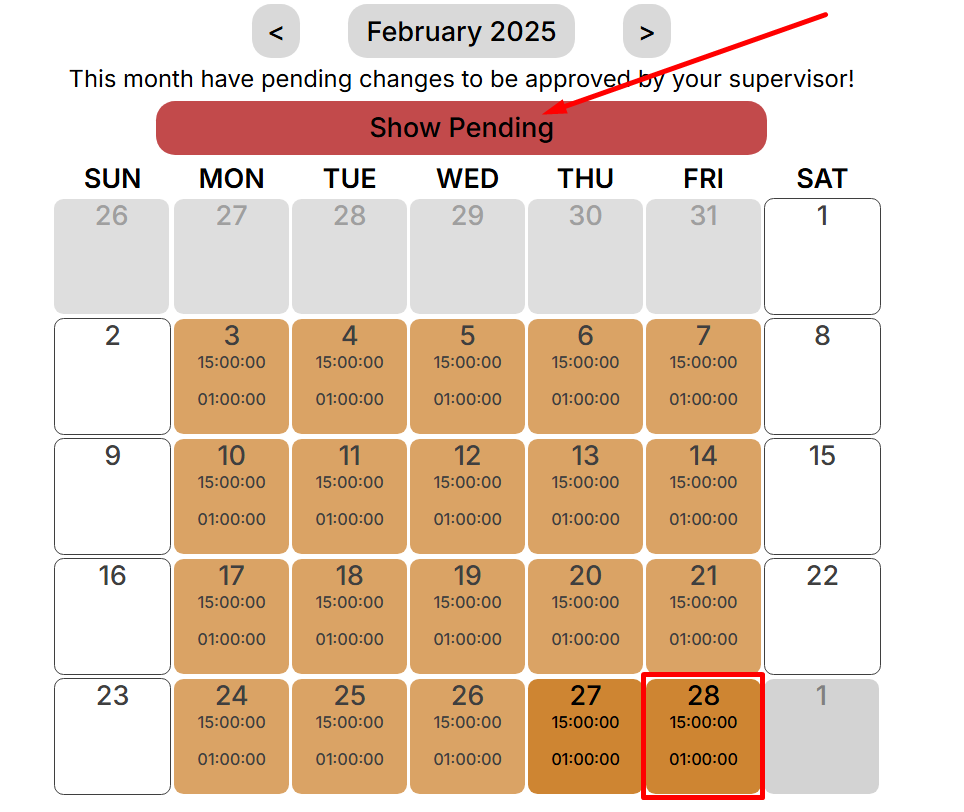
<span style="font-size: 12pt; font-family: Arial,sans-serif; color: #000000; background-color: transparent; font-weight: 400; font-style: normal; font-variant: normal; text-decoration: none; vertical-align: baseline; white-space: pre-wrap;">- To see what changes the contractor has made, you need to open their calendar.
By default, the user's calendar displays the confirmed employment schedule, and to display the changes that are expected, click the button "Show Pending" :</span>

[![](https://mngrman.a-tracker.net/uploads/images/gallery/2025-02/scaled-1680-/image-1740647248197.png)](https://mngrman.a-tracker.net/uploads/images/gallery/2025-02/image-1740647248197.png)

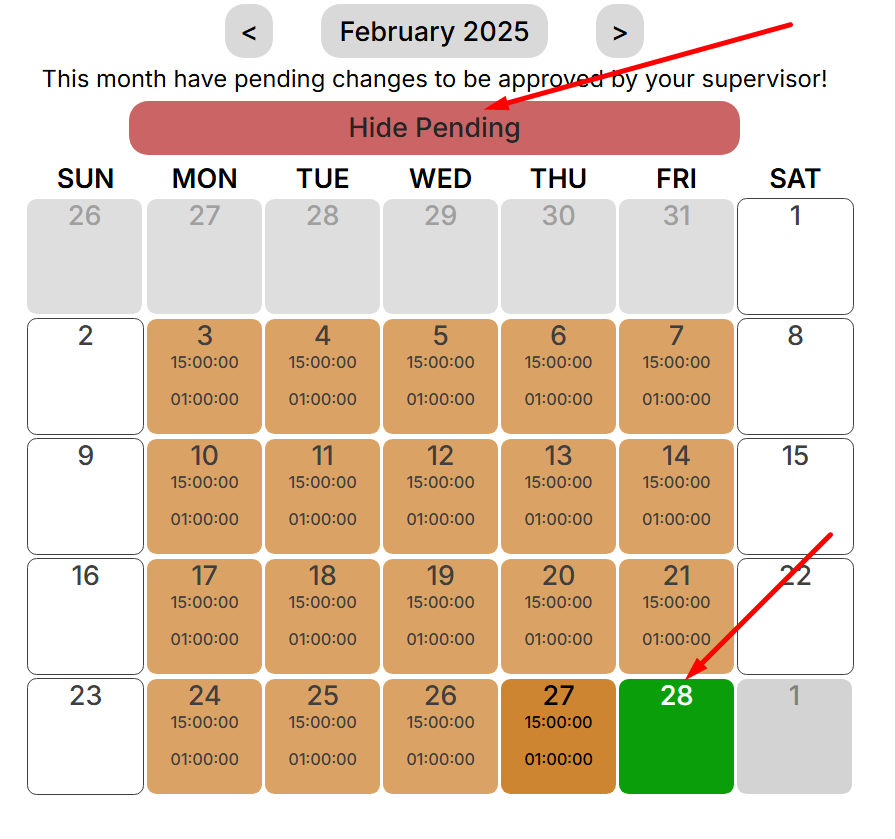
<span style="font-size: 12pt; font-family: Arial,sans-serif; color: #000000; background-color: transparent; font-weight: 400; font-style: normal; font-variant: normal; text-decoration: none; vertical-align: baseline; white-space: pre-wrap;">- Pending changes will be displayed:</span>

[![](https://mngrman.a-tracker.net/uploads/images/gallery/2025-02/scaled-1680-/image-1740647316752.png)](https://mngrman.a-tracker.net/uploads/images/gallery/2025-02/image-1740647316752.png)

<span style="font-size: 12pt; font-family: Arial,sans-serif; color: #000000; background-color: transparent; font-weight: 400; font-style: normal; font-variant: normal; text-decoration: none; vertical-align: baseline; white-space: pre-wrap;">-  The manager can independently customize the work schedule for contract workers in the team. To do this, select or find a contractor in the list and click on the highlighted field.</span>

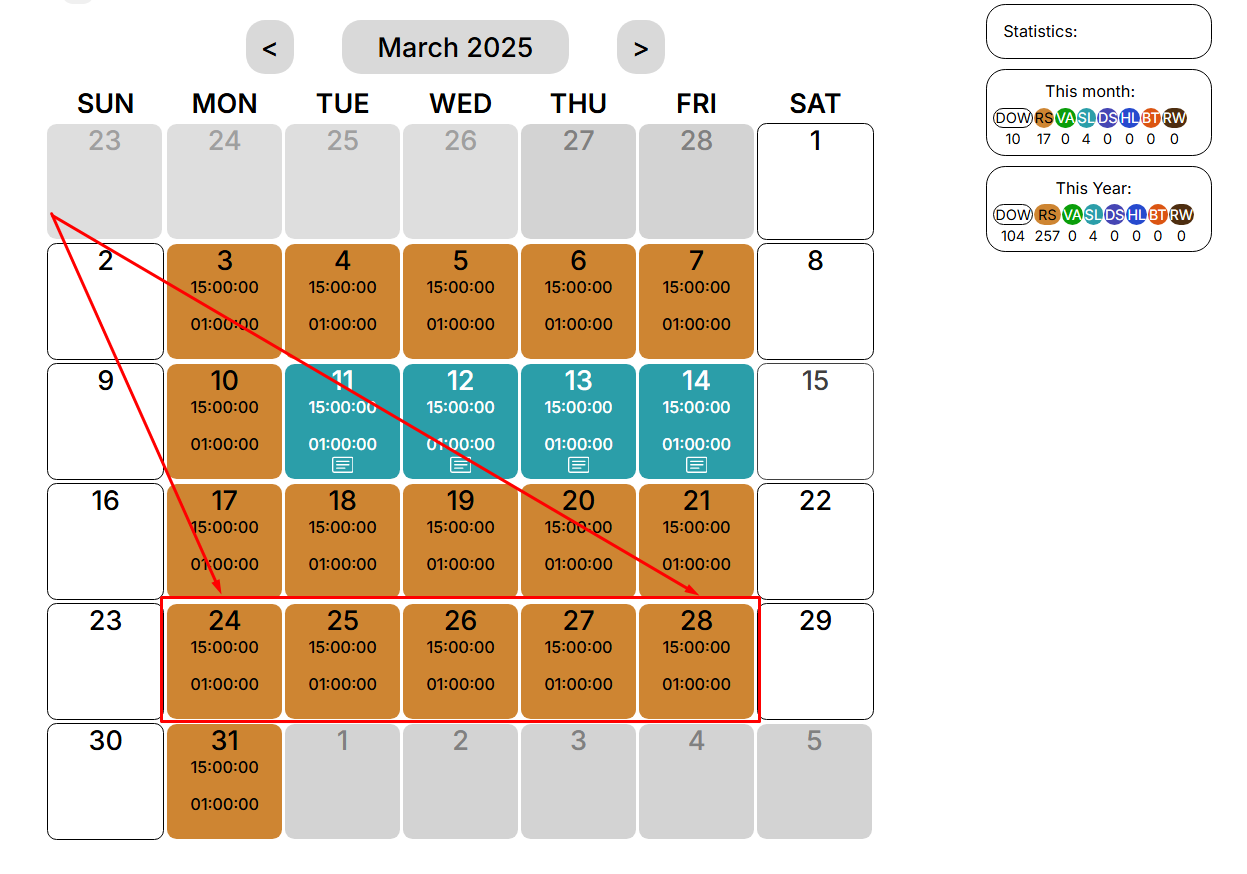
<span style="font-size: 12pt; font-family: Arial,sans-serif; color: #000000; background-color: transparent; font-weight: 400; font-style: normal; font-variant: normal; text-decoration: none; vertical-align: baseline; white-space: pre-wrap;">-  We will go to the “My schedule” section of the selected user. Highlighting the necessary dates with the mouse cursor, you can proceed to editing the employment schedule:</span>


[![](https://mngrman.a-tracker.net/uploads/images/gallery/2025-02/scaled-1680-/image-1740647970770.png)](https://mngrman.a-tracker.net/uploads/images/gallery/2025-02/image-1740647970770.png)

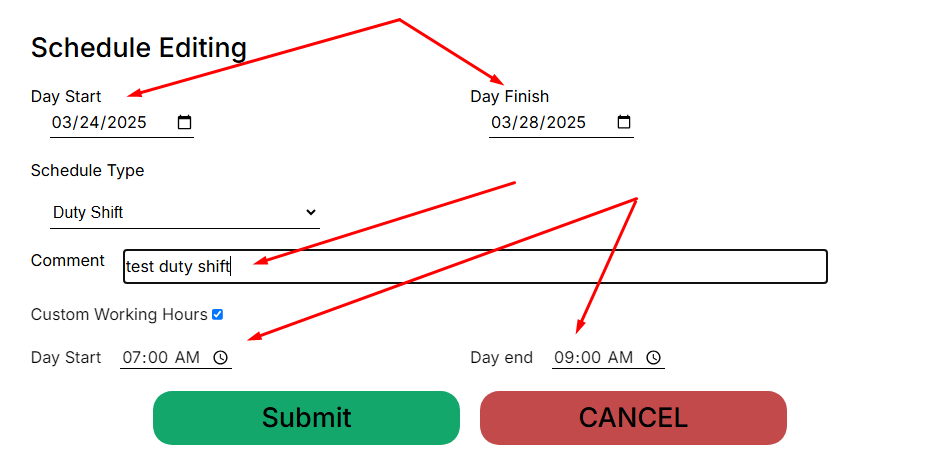
<span style="font-size: 12pt; font-family: Arial,sans-serif; color: #000000; background-color: transparent; font-weight: 400; font-style: normal; font-variant: normal; text-decoration: none; vertical-align: baseline; white-space: pre-wrap;">Depending on the type of work schedule we set, you can add a comment or Custom Working Hours that will be applied to the selected days</span>

[![](https://mngrman.a-tracker.net/uploads/images/gallery/2025-02/scaled-1680-/image-1740648810277.png)](https://mngrman.a-tracker.net/uploads/images/gallery/2025-02/image-1740648810277.png)


<span style="font-size: 12pt; font-family: Arial,sans-serif; color: #000000; background-color: transparent; font-weight: 400; font-style: normal; font-variant: normal; text-decoration: none; vertical-align: baseline; white-space: pre-wrap;">Important: in this case, the change in the contract employee's work schedule is applied immediately, without the need for confirmation from the manager.</span>

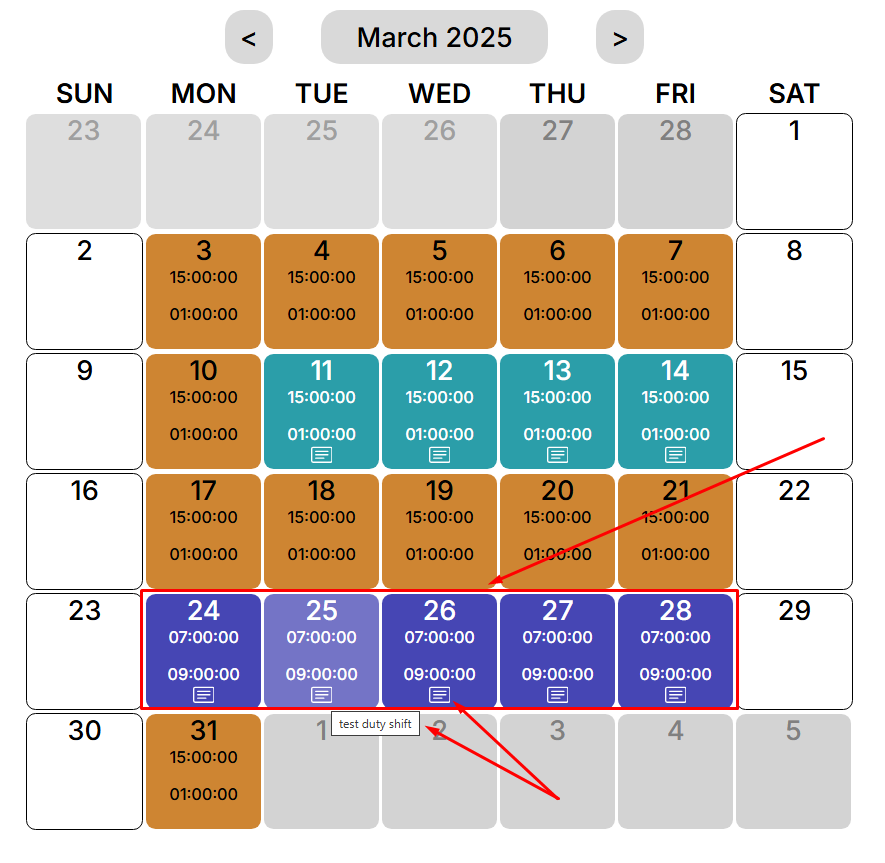
<span style="font-size: 12pt; font-family: Arial,sans-serif; color: #000000; background-color: transparent; font-weight: 400; font-style: normal; font-variant: normal; text-decoration: none; vertical-align: baseline; white-space: pre-wrap;">After confirming the changes, the calendar will be updated. We can see that the “Duty Shift” work schedule type has been applied with Custom Working Hours 07:00am - 09:00am and the following comment entered.</span>

[![](https://mngrman.a-tracker.net/uploads/images/gallery/2025-02/scaled-1680-/image-1740648953815.png)](https://mngrman.a-tracker.net/uploads/images/gallery/2025-02/image-1740648953815.png)

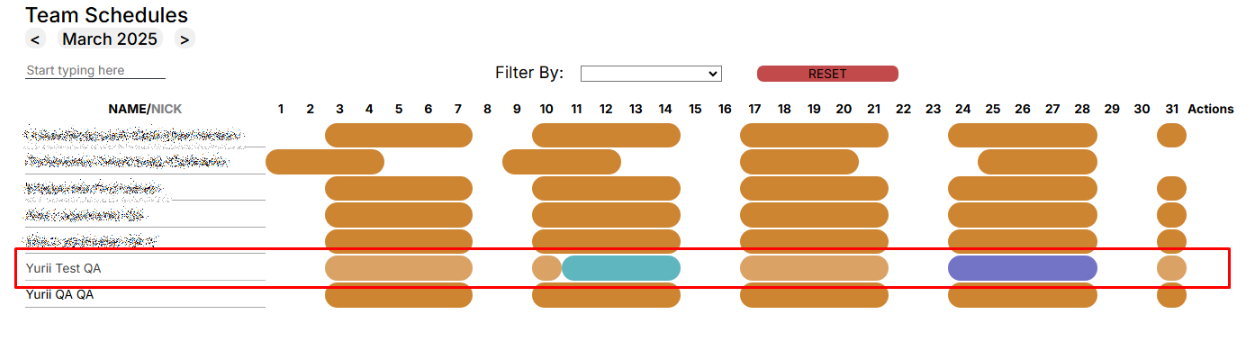
<span style="font-size: 12pt; font-family: Arial,sans-serif; color: #000000; background-color: transparent; font-weight: 400; font-style: normal; font-variant: normal; text-decoration: none; vertical-align: baseline; white-space: pre-wrap;">In the “Team schedule” menu, the employment schedule of the selected contractor is repainted in a different color, in accordance with the updated employment schedule</span>

[![](https://mngrman.a-tracker.net/uploads/images/gallery/2025-09/scaled-1680-/image-1757680948073.png)](https://mngrman.a-tracker.net/uploads/images/gallery/2025-09/image-1757680948073.png)

# Auto Schedule 5/2, 4/4, 4/3

<span style="font-size: 12pt; font-family: Arial,sans-serif; color: #000000; background-color: transparent; font-weight: 400; font-style: normal; font-variant: normal; text-decoration: none; vertical-align: baseline; white-space: pre-wrap;">The Action Tracker system allows you to set up an automatic schedule for team members, with a start date for the schedule.</span>

<span style="font-size: 12pt; font-family: Arial,sans-serif; color: #000000; background-color: transparent; font-weight: 400; font-style: normal; font-variant: normal; text-decoration: none; vertical-align: baseline; white-space: pre-wrap;">At this stage the following automatic charts are available for use:</span>

- **<span style="font-size: 12pt; font-family: Arial, sans-serif; color: rgb(0, 0, 0); background-color: transparent; font-style: normal; font-variant: normal; text-decoration: none; vertical-align: baseline; white-space: pre-wrap;">5/2 - five-day work schedule</span>**
- **<span style="font-size: 12pt; font-family: Arial, sans-serif; color: rgb(0, 0, 0); background-color: transparent; font-style: normal; font-variant: nor
  mal; text-decoration: none; vertical-align: baseline; white-space: pre-wrap;">4/4 - 4 weekdays and 4 weekends</span>**
- **<span style="font-size: 12pt; font-family: Arial, sans-serif; color: rgb(0, 0, 0); background-color: transparent; font-style: normal; font-variant: normal; text-decoration: none; vertical-align: baseline; white-space: pre-wrap;">4/3 - 4 weekdays and 3 weekends</span>**

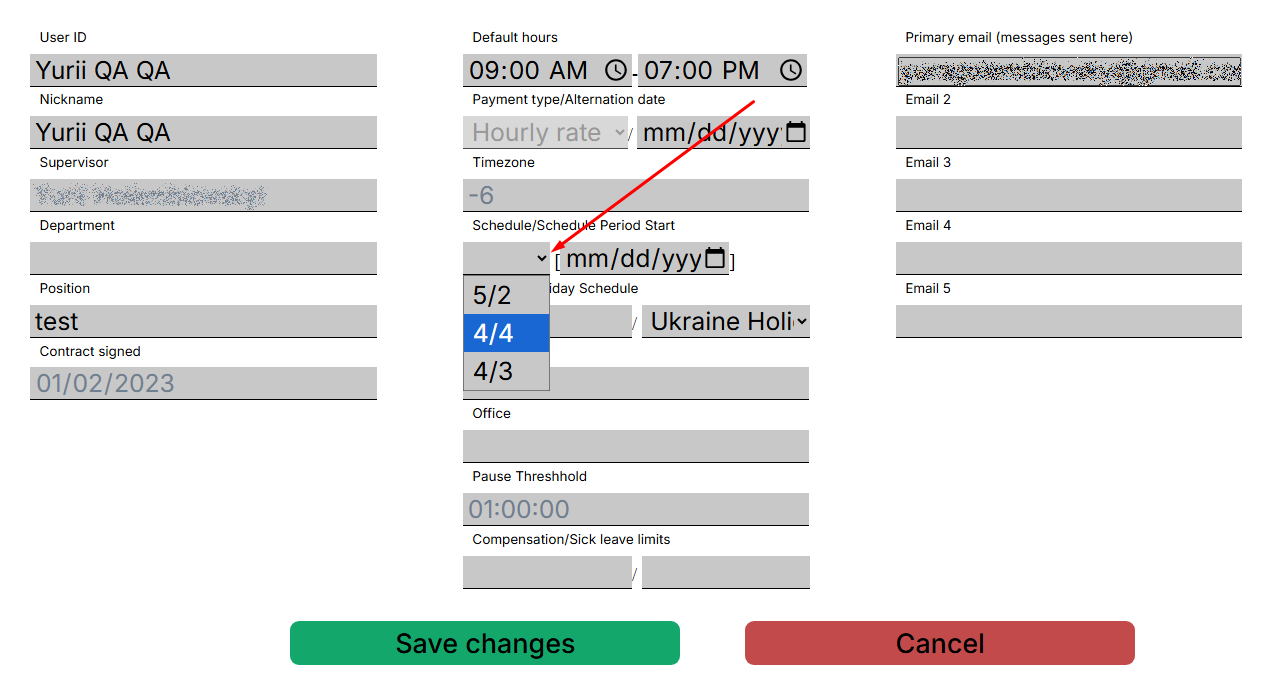
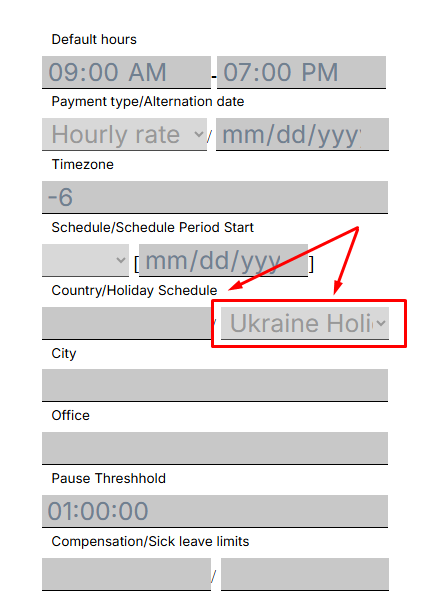
<span style="font-size: 12pt; font-family: Arial,sans-serif; color: #000000; background-color: transparent; font-weight: 400; font-style: normal; font-variant: normal; text-decoration: none; vertical-align: baseline; white-space: pre-wrap;">To set the automatic schedule you should go to “My Team” and open the profile of the selected contractor.
Select from the drop-down list in the contractor's profile</span>

[![](https://mngrman.a-tracker.net/uploads/images/gallery/2025-09/scaled-1680-/image-1757681140679.png)](https://mngrman.a-tracker.net/uploads/images/gallery/2025-09/image-1757681140679.png)

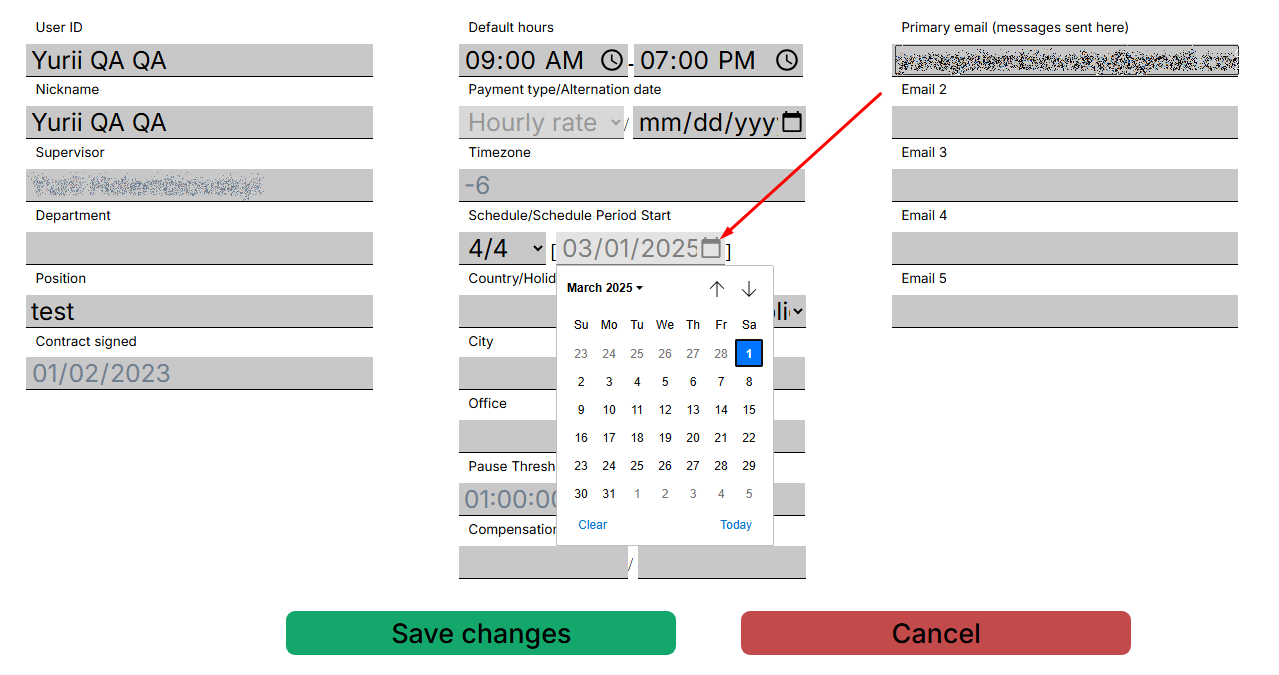
<span style="font-size: 12pt; font-family: Arial,sans-serif; color: #000000; background-color: transparent; font-weight: 400; font-style: normal; font-variant: normal; text-decoration: none; vertical-align: baseline; white-space: pre-wrap;">It is important to set the start date of the chart and save the changes afterwards.The work shifts are set, followed by weekend shifts.</span>

[![](https://mngrman.a-tracker.net/uploads/images/gallery/2025-09/scaled-1680-/image-1757681232971.png)](https://mngrman.a-tracker.net/uploads/images/gallery/2025-09/image-1757681232971.png)

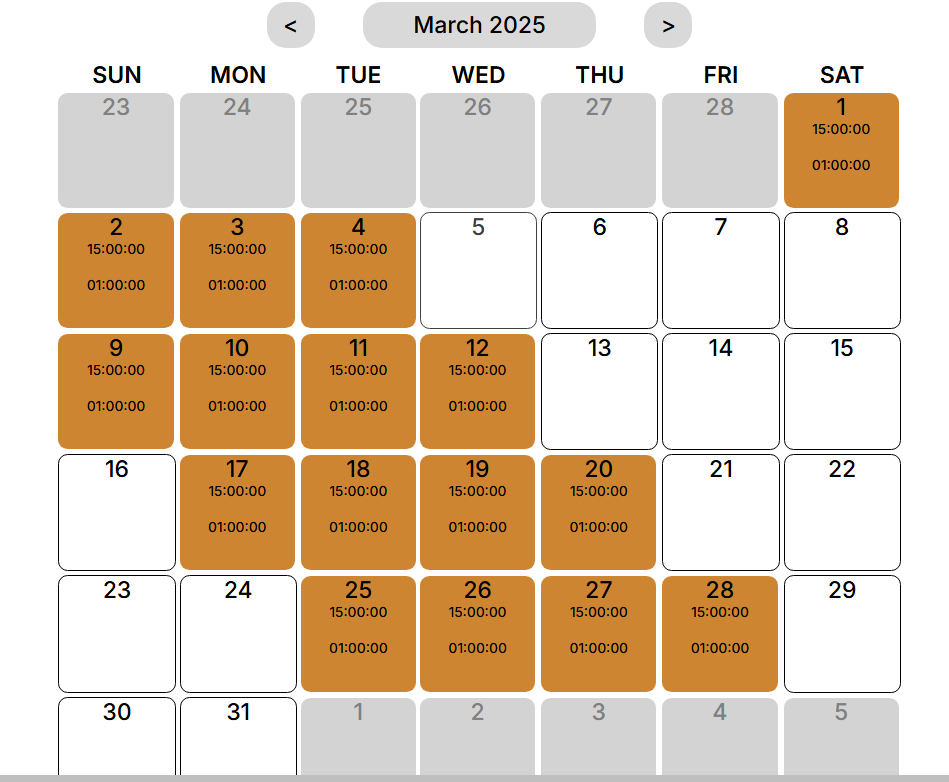
<span style="font-size: 12pt; font-family: Arial,sans-serif; color: #000000; background-color: transparent; font-weight: 400; font-style: normal; font-variant: normal; text-decoration: none; vertical-align: baseline; white-space: pre-wrap;">The Action Tracker system will recalculate and update schedule.You can view the entered data in the calendar or in the “Team Schedule” menu.You can see that 4 regular shifts and 4 day off are set.</span>

[![](https://mngrman.a-tracker.net/uploads/images/gallery/2025-02/scaled-1680-/image-1740149842541.png)](https://mngrman.a-tracker.net/uploads/images/gallery/2025-02/image-1740149842541.png)

[![](https://mngrman.a-tracker.net/uploads/images/gallery/2025-09/scaled-1680-/image-1757681302931.png)](https://mngrman.a-tracker.net/uploads/images/gallery/2025-09/image-1757681302931.png)



**<span style="font-size: 12pt; font-family: Arial, sans-serif; color: rgb(0, 0, 0); background-color: transparent; font-style: normal; font-variant: normal; text-decoration: none; vertical-align: baseline; white-space: pre-wrap;">Pay attention: </span>**

- **<span style="font-size: 12pt; font-family: Arial, sans-serif; color: rgb(0, 0, 0); background-color: transparent; font-style: normal; font-variant: normal; text-decoration: none; vertical-align: baseline; white-space: pre-wrap;">A manually schedule has a higher priority than an automatic one..</span>**
- **<span style="font-size: 12pt; font-family: Arial, sans-serif; color: rgb(0, 0, 0); background-color: transparent; font-style: normal; font-variant: normal; text-decoration: none; vertical-align: baseline; white-space: pre-wrap;">If the schedule has already been set manually, the automatic schedule will not replace it, but will only supplement it.</span>**
- **<span style="font-size: 12pt; font-family: Arial, sans-serif; color: rgb(0, 0, 0); background-color: transparent; font-style: normal; font-variant: normal; text-decoration: none; vertical-align: baseline; white-space: pre-wrap;">The automatic schedule can only be applied to one contractor at a time.</span>**

# Holiday Schedule

<span style="font-size: 12pt; font-family: Arial,sans-serif; color: #000000; background-color: transparent; font-weight: 400; font-style: normal; font-variant: normal; text-decoration: none; vertical-align: baseline; white-space: pre-wrap;">Holiday Schedule - necessary for setting holidays, must be applied separately for each contractor in the team. This type of event in the employment schedule is counted as a paid day off.</span>

[![](https://mngrman.a-tracker.net/uploads/images/gallery/2025-09/scaled-1680-/image-1757682495588.png)](https://mngrman.a-tracker.net/uploads/images/gallery/2025-09/image-1757682495588.png)

<span style="font-size: 12pt; font-family: Arial,sans-serif; color: #000000; background-color: transparent; font-weight: 400; font-style: normal; font-variant: normal; text-decoration: none; vertical-align: baseline; white-space: pre-wrap;">To configure the holiday setup for the selected contractor, open the profile of the relevant contractor, click the “Edit User” button, and select the setup from the drop-down list. Then click the “Save changes” button.</span>

[![](https://mngrman.a-tracker.net/uploads/images/gallery/2025-09/scaled-1680-/image-1757682719585.png)](https://mngrman.a-tracker.net/uploads/images/gallery/2025-09/image-1757682719585.png)

<span style="font-size: 12pt; font-family: Arial,sans-serif; color: #000000; background-color: transparent; font-weight: 400; font-style: normal; font-variant: normal; text-decoration: none; vertical-align: baseline; white-space: pre-wrap;">The action will be accompanied by a window about successful execution.</span>

[![](https://mngrman.a-tracker.net/uploads/images/gallery/2025-09/scaled-1680-/image-1757682866776.png)](https://mngrman.a-tracker.net/uploads/images/gallery/2025-09/image-1757682866776.png)

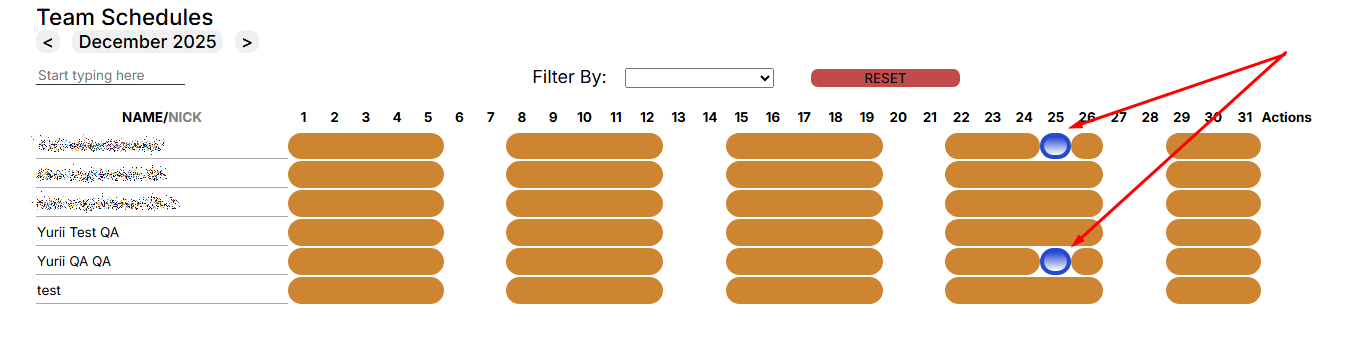
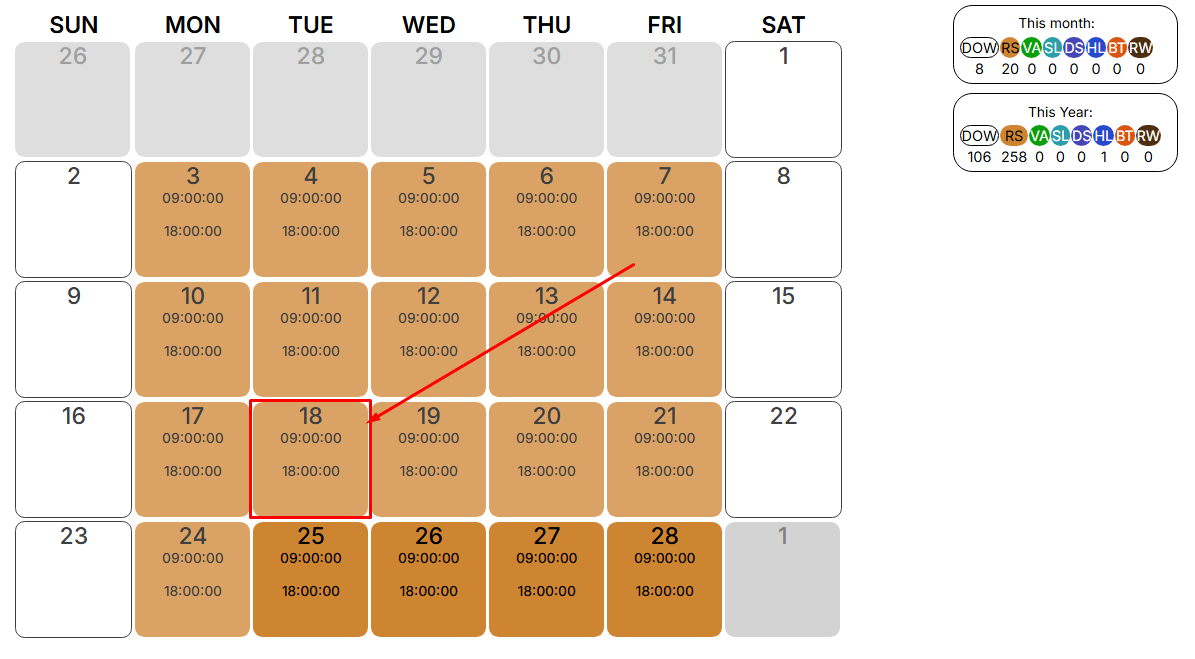
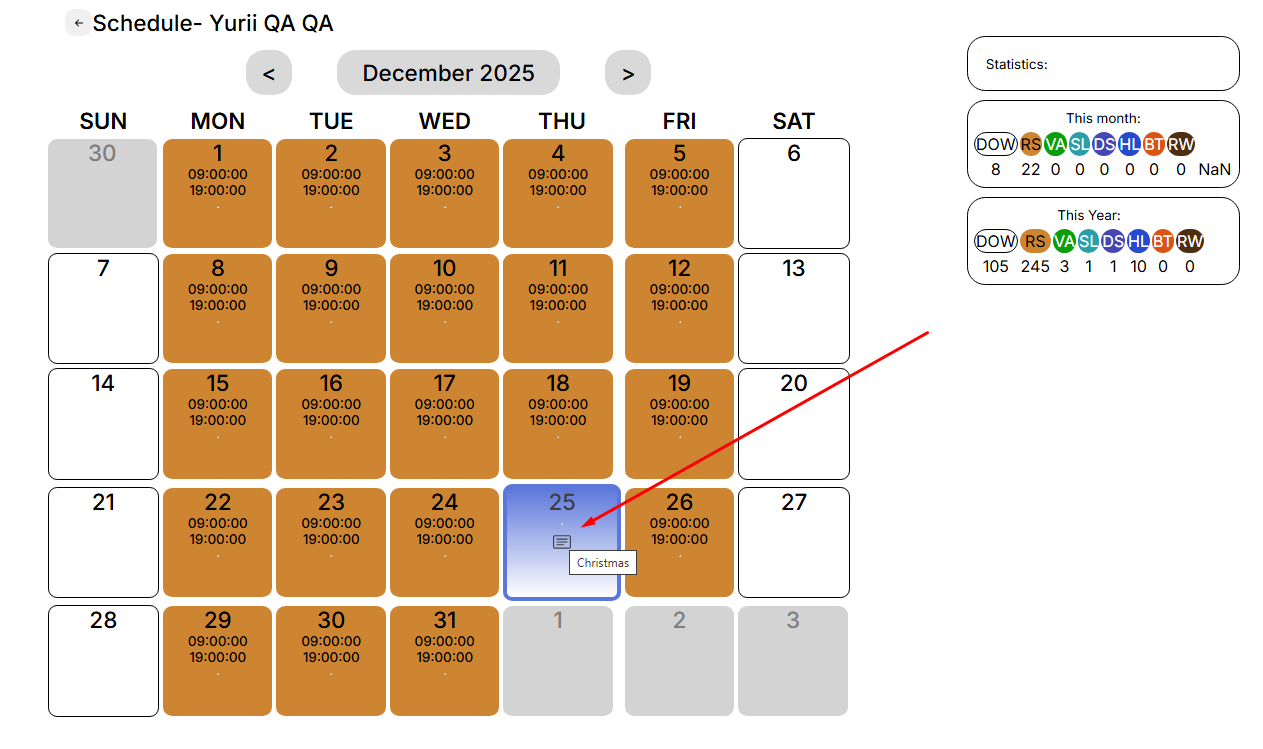
<span style="font-size: 12pt; font-family: Arial,sans-serif; color: #000000; background-color: transparent; font-weight: 400; font-style: normal; font-variant: normal; text-decoration: none; vertical-align: baseline; white-space: pre-wrap;">In the “Team Schedule” menu, the holiday will only apply to the selected contractor.
</span>

[![](https://mngrman.a-tracker.net/uploads/images/gallery/2025-09/scaled-1680-/image-1757683265336.png)](https://mngrman.a-tracker.net/uploads/images/gallery/2025-09/image-1757683265336.png)


[![](https://mngrman.a-tracker.net/uploads/images/gallery/2025-09/scaled-1680-/image-1757683100471.png)](https://mngrman.a-tracker.net/uploads/images/gallery/2025-09/image-1757683100471.png)

**<span style="font-size: 12pt; font-family: Arial, sans-serif; color: rgb(0, 0, 0); background-color: transparent; font-style: normal; font-variant: normal; text-decoration: none; vertical-align: baseline; white-space: pre-wrap;">Pay attention to: </span>**

- **<span style="font-size: 12pt; font-family: Arial, sans-serif; color: rgb(0, 0, 0); background-color: transparent; font-style: normal; font-variant: normal; text-decoration: none; vertical-align: baseline; white-space: pre-wrap;">The holiday will not apply to a contract employee who already had a personal schedule for that day.</span>**
- **<span style="font-size: 12pt; font-family: Arial, sans-serif; color: rgb(0, 0, 0); background-color: transparent; font-style: normal; font-variant: normal; text-decoration: none; vertical-align: baseline; white-space: pre-wrap;">The holiday will not apply to a contract worker who has less than one year to sign the contract.</span>**

# Contractor`s Data and Schedule corrections

<span style="font-size: 12pt; font-family: Arial,sans-serif; color: #000000; background-color: transparent; font-weight: 400; font-style: normal; font-variant: normal; text-decoration: none; vertical-align: baseline; white-space: pre-wrap;">The Action Tracker system implements the functionality of making adjustments to the activity of contractors who are added to the team.</span>

<span style="font-size: 12pt; font-family: Arial,sans-serif; color: #000000; background-color: transparent; font-weight: 400; font-style: normal; font-variant: normal; text-decoration: none; vertical-align: baseline; white-space: pre-wrap;">To start making adjustments, you need find the right contractor and open their calendar.</span>

[![](https://mngrman.a-tracker.net/uploads/images/gallery/2025-09/scaled-1680-/image-1757681720097.png)](https://mngrman.a-tracker.net/uploads/images/gallery/2025-09/image-1757681720097.png)

<span style="font-size: 12pt; font-family: Arial,sans-serif; color: #000000; background-color: transparent; font-weight: 400; font-style: normal; font-variant: normal; text-decoration: none; vertical-align: baseline; white-space: pre-wrap;">In the calendar, find the desired day, click on it.</span>

[![](https://mngrman.a-tracker.net/uploads/images/gallery/2025-02/scaled-1680-/image-1740490566063.png)](https://mngrman.a-tracker.net/uploads/images/gallery/2025-02/image-1740490566063.png)

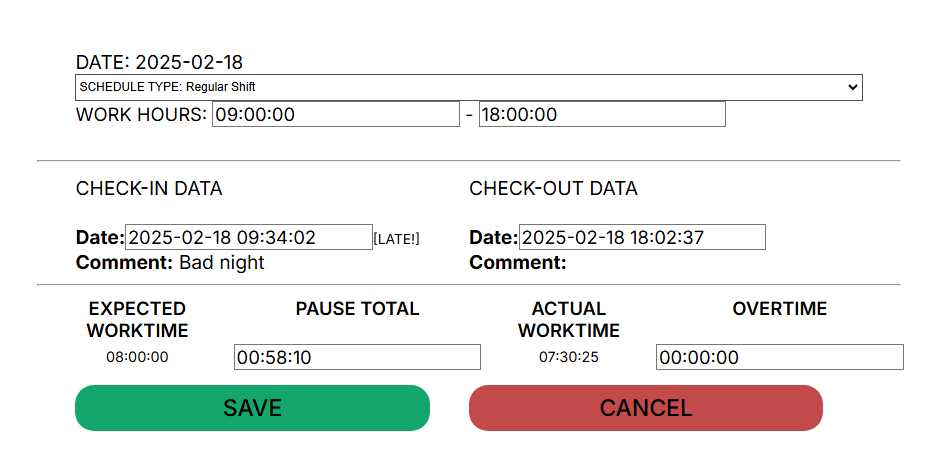
<span style="font-size: 12pt; font-family: Arial,sans-serif; color: #000000; background-color: transparent; font-weight: 400; font-style: normal; font-variant: normal; text-decoration: none; vertical-align: baseline; white-space: pre-wrap;">A window opens with the parameters that can be edited. Click the “EDIT” button, the fields that can be edited are highlighted.</span>

[![](https://mngrman.a-tracker.net/uploads/images/gallery/2025-02/scaled-1680-/image-1740495946375.png)](https://mngrman.a-tracker.net/uploads/images/gallery/2025-02/image-1740495946375.png)

<span style="font-size: 12pt; font-family: Arial,sans-serif; color: #000000; background-color: transparent; font-weight: 400; font-style: normal; font-variant: normal; text-decoration: none; vertical-align: baseline; white-space: pre-wrap;">The following fields are available for correcting and entering data:</span>

- <span style="font-size: 12pt; font-family: Arial,sans-serif; color: #000000; background-color: transparent; font-weight: 400; font-style: normal; font-variant: normal; text-decoration: none; vertical-align: baseline; white-space: pre-wrap;">Schedule Type</span>

[![](https://mngrman.a-tracker.net/uploads/images/gallery/2025-02/scaled-1680-/image-1740496586489.png)](https://mngrman.a-tracker.net/uploads/images/gallery/2025-02/image-1740496586489.png)

- <span style="font-size: 12pt; font-family: Arial,sans-serif; color: #000000; background-color: transparent; font-weight: 400; font-style: normal; font-variant: normal; text-decoration: none; vertical-align: baseline; white-space: pre-wrap;">Work Hours - work hours of reverse day employment</span>
- <span style="font-size: 12pt; font-family: Arial,sans-serif; color: #000000; background-color: transparent; font-weight: 400; font-style: normal; font-variant: normal; text-decoration: none; vertical-align: baseline; white-space: pre-wrap;">Check-in/Check-out Data</span>
- <span style="font-size: 12pt; font-family: Arial,sans-serif; color: #000000; background-color: transparent; font-weight: 400; font-style: normal; font-variant: normal; text-decoration: none; vertical-align: baseline; white-space: pre-wrap;">Pause Total</span>
- <span style="font-size: 12pt; font-family: Arial,sans-serif; color: #000000; background-color: transparent; font-weight: 400; font-style: normal; font-variant: normal; text-decoration: none; vertical-align: baseline; white-space: pre-wrap;">Overtime</span>

<span style="font-size: 12pt; font-family: Arial,sans-serif; color: #000000; background-color: transparent; font-weight: 400; font-style: normal; font-variant: normal; text-decoration: none; vertical-align: baseline; white-space: pre-wrap;">To save the corrected data, click the “Save” button. After saving the corrected data, the system will recalculate the hours.</span>

<span style="font-size: 12pt; font-family: Arial,sans-serif; color: #000000; background-color: transparent; font-weight: 400; font-style: normal; font-variant: normal; text-decoration: none; vertical-align: baseline; white-space: pre-wrap;">When generating a report, the corrected data will be used and a mark will be set on the adjustments made.</span>

<span style="font-size: 12pt; font-family: Arial,sans-serif; color: #000000; background-color: transparent; font-weight: 400; font-style: normal; font-variant: normal; text-decoration: none; vertical-align: baseline; white-space: pre-wrap;">Schedule Types:</span>

[![](https://mngrman.a-tracker.net/uploads/images/gallery/2025-02/scaled-1680-/image-1740655597985.png)](https://mngrman.a-tracker.net/uploads/images/gallery/2025-02/image-1740655597985.png)

- <span style="font-size: 12pt; font-family: Arial,sans-serif; color: #000000; background-color: transparent; font-weight: 400; font-style: normal; font-variant: normal; text-decoration: none; vertical-align: baseline; white-space: pre-wrap;">DOW - DayOff/Weekend - absence, unpaid</span>
- <span style="font-size: 12pt; font-family: Arial,sans-serif; color: #000000; background-color: transparent; font-weight: 400; font-style: normal; font-variant: normal; text-decoration: none; vertical-align: baseline; white-space: pre-wrap;">RS - Regular Shift - paid</span>
- <span style="font-size: 12pt; font-family: Arial,sans-serif; color: #000000; background-color: transparent; font-weight: 400; font-style: normal; font-variant: normal; text-decoration: none; vertical-align: baseline; white-space: pre-wrap;">VA - Vacation - absence, paid</span>
- <span style="font-size: 12pt; font-family: Arial,sans-serif; color: #000000; background-color: transparent; font-weight: 400; font-style: normal; font-variant: normal; text-decoration: none; vertical-align: baseline; white-space: pre-wrap;">SL - Sick Leave - absence, paid</span>
- <span style="font-size: 12pt; font-family: Arial,sans-serif; color: #000000; background-color: transparent; font-weight: 400; font-style: normal; font-variant: normal; text-decoration: none; vertical-align: baseline; white-space: pre-wrap;">DS - Duty Shift - paid</span>
- <span style="font-size: 12pt; font-family: Arial,sans-serif; color: #000000; background-color: transparent; font-weight: 400; font-style: normal; font-variant: normal; text-decoration: none; vertical-align: baseline; white-space: pre-wrap;">HL - Holiday - absence, paid</span>
- <span style="font-size: 12pt; font-family: Arial,sans-serif; color: #000000; background-color: transparent; font-weight: 400; font-style: normal; font-variant: normal; text-decoration: none; vertical-align: baseline; white-space: pre-wrap;">BT - Business Trip - paid</span>
- <span style="font-size: 12pt; font-family: Arial,sans-serif; color: #000000; background-color: transparent; font-weight: 400; font-style: normal; font-variant: normal; text-decoration: none; vertical-align: baseline; white-space: pre-wrap;">RW - Remote Work - paid, mark the day of work from home</span>

**<span style="font-size: 12pt; font-family: Arial, sans-serif; color: rgb(0, 0, 0); background-color: transparent; font-style: normal; font-variant: normal; text-decoration: none; vertical-align: baseline; white-space: pre-wrap;">Important! You can only correct data for previous periods. </span>**

**<span style="font-size: 12pt; font-family: Arial, sans-serif; color: rgb(0, 0, 0); background-color: transparent; font-style: normal; font-variant: normal; text-decoration: none; vertical-align: baseline; white-space: pre-wrap;">Supervisor cannot change the data himself.</span>**

**<span style="font-size: 12pt; font-family: Arial, sans-serif; color: rgb(0, 0, 0); background-color: transparent; font-style: normal; font-variant: normal; text-decoration: none; vertical-align: baseline; white-space: pre-wrap;">You can only edit existing data: Check-in/Check-out.</span>**